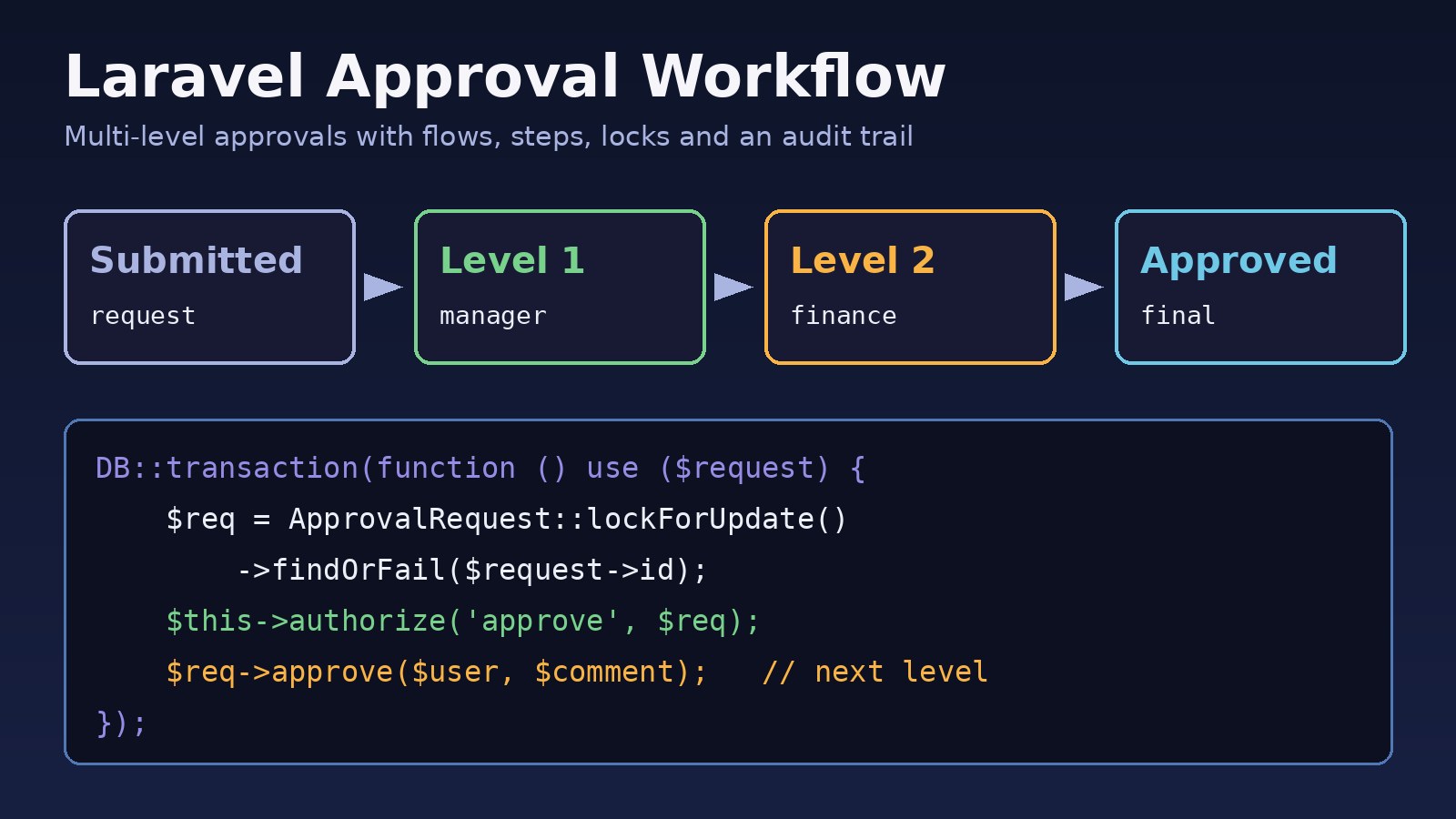
Purchase requests, leave applications, expense claims, discount approvals: sooner or later every business app needs a laravel approval workflow. The first version is usually a status column and a few if statements in a controller. It works until the business asks for a second level of approval, a finance sign-off above a certain amount, or a history of who approved what. Then the bugs start: requests approved twice, levels skipped, managers approving their own requests, and no audit trail when something goes wrong. This guide shows how to fix that with a small, table-driven design: flows and steps in the database, row locks around every decision, policies for permission checks and an append-only history.
Problem: A Laravel Approval Workflow That Doesn't Scale
A typical starting point looks like this:
// The quick version that causes trouble later
public function approve(PurchaseRequest $pr)
{
    if ($pr->status === 'pending_manager') {
        $pr->update(['status' => 'pending_finance']);
    } elseif ($pr->status === 'pending_finance') {
        $pr->update(['status' => 'approved']);
    }
    return back();
}
The approval rules live in code, the approver is never checked, two clicks at the same time both pass the if, and nothing records the decision. Every new document type gets a copy of this logic with small differences. Changing the number of levels means a deploy.
Symptoms
- The same request shows two approvals from one level, or moves two levels after a double click or a retried request.
- Users can approve requests they created, or requests assigned to another department, by calling the route directly.
- Adding a third approval level means editing controllers, Blade views and status strings in several places.
- Nobody can answer "who approved this and when?" because only the final status is stored.
- Database errors such as
SQLSTATE[23000]: Integrity constraint violation: 1062 Duplicate entryappear once you add a unique index without handling it, orThis action is unauthorized.(HTTP 403) appears for the wrong users because policy rules don't match the current level.
Root Cause
Three design problems cause almost all of these bugs:
- Rules are hard-coded. Levels and approver roles are strings inside
ifblocks, so each document type has its own slightly different workflow. - State changes aren't atomic. The code reads the status, decides, then writes. Two requests running at the same time both read the old status. Without a transaction and a row lock (
SELECT ... FOR UPDATE), both writes succeed. - History is overwritten. Updating a single
statuscolumn throws away who acted, at which level, and with what comment.
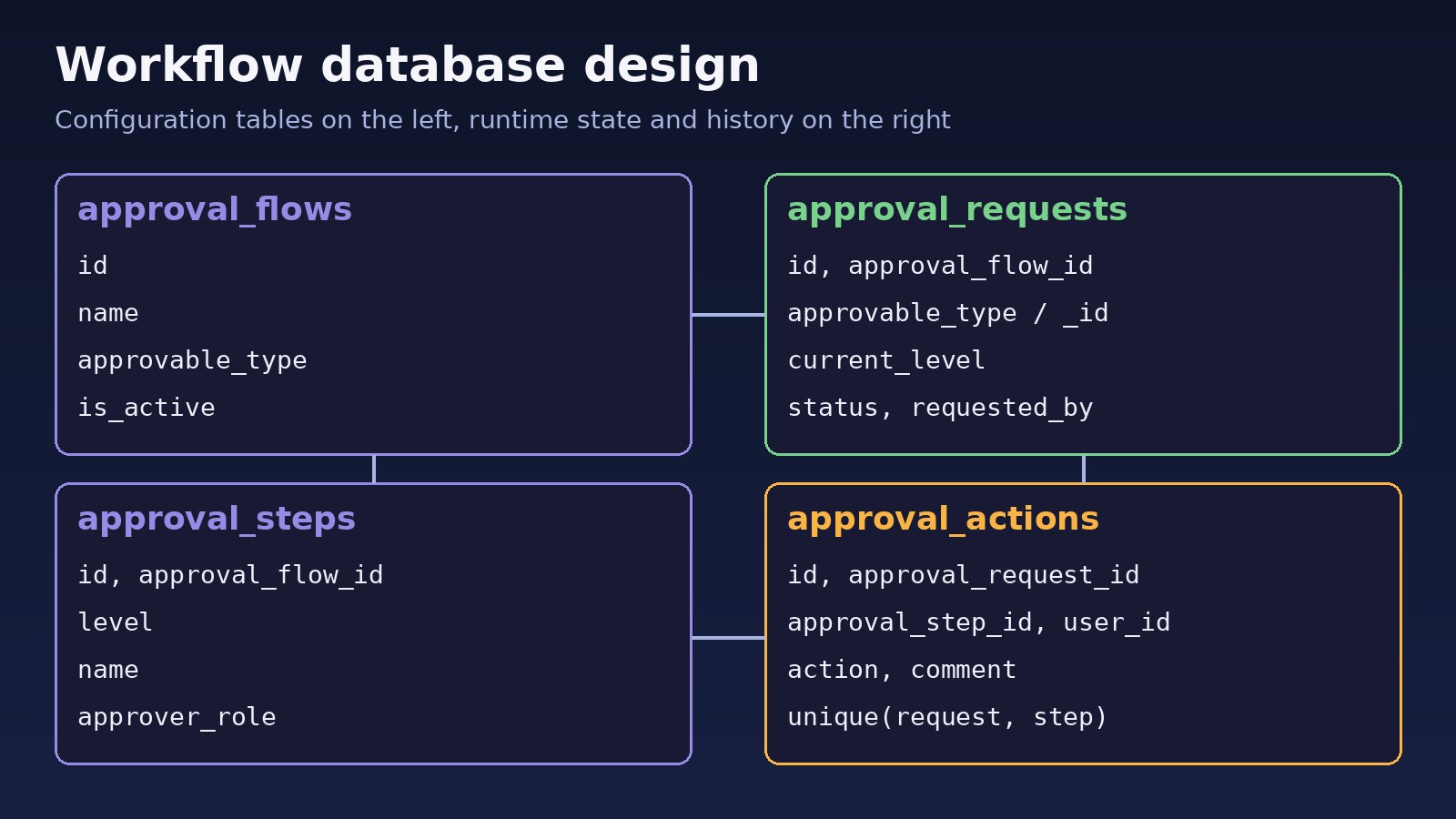
The fix is to separate configuration (which steps a flow has) from runtime state (where a specific request is) and history (every decision ever made).
Step-by-Step Solution
Step 1: Workflow database design
Four tables are enough for a multi-level approval system that works for any model:
// database/migrations/2026_10_24_000000_create_approval_tables.php
Schema::create('approval_flows', function (Blueprint $table) {
    $table->id();
    $table->string('name');
    $table->string('approvable_type');          // e.g. App\Models\PurchaseRequest
    $table->boolean('is_active')->default(true);
    $table->timestamps();
});

Schema::create('approval_steps', function (Blueprint $table) {
    $table->id();
    $table->foreignId('approval_flow_id')->constrained()->cascadeOnDelete();
    $table->unsignedTinyInteger('level');       // 1, 2, 3 ...
    $table->string('name');                     // "Manager", "Finance"
    $table->string('approver_role');            // role name checked by the policy
    $table->timestamps();
    $table->unique(['approval_flow_id', 'level']);
});

Schema::create('approval_requests', function (Blueprint $table) {
    $table->id();
    $table->foreignId('approval_flow_id')->constrained();
    $table->morphs('approvable');               // approvable_type + approvable_id
    $table->unsignedTinyInteger('current_level')->default(1);
    $table->string('status')->default('pending'); // pending, approved, rejected
    $table->foreignId('requested_by')->constrained('users');
    $table->timestamps();
});

Schema::create('approval_actions', function (Blueprint $table) {
    $table->id();
    $table->foreignId('approval_request_id')->constrained()->cascadeOnDelete();
    $table->foreignId('approval_step_id')->constrained();
    $table->foreignId('user_id')->constrained();
    $table->string('action');                   // approved, rejected
    $table->text('comment')->nullable();
    $table->timestamps();
    $table->unique(['approval_request_id', 'approval_step_id']); // one decision per level
});
The unique index on approval_actions is your last line of defence: even if application code has a bug, the database refuses a second decision for the same level.
Step 2: Models and a status enum
// app/Enums/ApprovalStatus.php
enum ApprovalStatus: string
{
    case Pending = 'pending';
    case Approved = 'approved';
    case Rejected = 'rejected';
}

// app/Models/ApprovalRequest.php
class ApprovalRequest extends Model
{
    protected $fillable = ['approval_flow_id', 'current_level', 'status', 'requested_by'];

    protected function casts(): array
    {
        return ['status' => ApprovalStatus::class];
    }

    public function approvable(): MorphTo { return $this->morphTo(); }
    public function flow(): BelongsTo { return $this->belongsTo(ApprovalFlow::class, 'approval_flow_id'); }
    public function actions(): HasMany { return $this->hasMany(ApprovalAction::class); }

    public function currentStep(): ?ApprovalStep
    {
        return $this->flow->steps()->where('level', $this->current_level)->first();
    }
}

// app/Models/Concerns/HasApprovals.php - add to any model that needs approval
trait HasApprovals
{
    public function approvalRequests(): MorphMany
    {
        return $this->morphMany(ApprovalRequest::class, 'approvable');
    }
}
Give ApprovalFlow a steps() relation (hasMany(ApprovalStep::class)->orderBy('level')). The polymorphic approvable relation means the same tables serve purchase requests, leave requests and invoices.
Step 3: Submit a request
public function submit(Model $approvable, User $user): ApprovalRequest
{
    $flow = ApprovalFlow::where('approvable_type', $approvable::class)
        ->where('is_active', true)
        ->firstOrFail();

    return $approvable->approvalRequests()->create([
        'approval_flow_id' => $flow->id,
        'current_level'    => 1,
        'status'           => ApprovalStatus::Pending,
        'requested_by'     => $user->id,
    ]);
}
Step 4: Approve and reject inside a transaction with a row lock
This is the part that fixes double approvals. lockForUpdate() makes a second request wait until the first transaction commits, and then it sees the new level and status.
// app/Services/ApprovalService.php
class ApprovalService
{
    public function decide(ApprovalRequest $request, User $user, string $action, ?string $comment = null): ApprovalRequest
    {
        return DB::transaction(function () use ($request, $user, $action, $comment) {
            $locked = ApprovalRequest::whereKey($request->id)->lockForUpdate()->firstOrFail();

            if ($locked->status !== ApprovalStatus::Pending) {
                throw ValidationException::withMessages(['approval' => 'This request is already closed.']);
            }

            Gate::forUser($user)->authorize('decide', $locked);

            $step = $locked->currentStep();

            $locked->actions()->create([
                'approval_step_id' => $step->id,
                'user_id'          => $user->id,
                'action'           => $action,
                'comment'          => $comment,
            ]);

            if ($action === 'rejected') {
                $locked->update(['status' => ApprovalStatus::Rejected]);
            } elseif ($locked->flow->steps()->where('level', '>', $locked->current_level)->exists()) {
                $locked->increment('current_level');
            } else {
                $locked->update(['status' => ApprovalStatus::Approved]);
            }

            event(new ApprovalDecided($locked, $user, $action));

            return $locked->fresh();
        });
    }
}
Row locks need a database engine that supports them (MySQL InnoDB or PostgreSQL). SQLite ignores lockForUpdate(), so don't rely on local SQLite tests to prove concurrency is safe.
Step 5: Authorize the current approver with a policy
Only a user with the role for the current level should be able to act, and never the person who submitted the request. If you already use roles, this fits on top of Laravel role-based permissions.
// app/Policies/ApprovalRequestPolicy.php
class ApprovalRequestPolicy
{
    public function decide(User $user, ApprovalRequest $request): bool
    {
        if ($request->requested_by === $user->id) {
            return false;                       // no self-approval
        }

        $step = $request->currentStep();

        return $step !== null && $user->hasRole($step->approver_role);
    }
}
hasRole() comes from spatie/laravel-permission; replace it with your own role check if you don't use that package. Laravel discovers the policy automatically when it follows the App\Policies\ModelPolicy naming convention.
Step 6: Controller and routes
// routes/web.php
Route::post('/approvals/{approvalRequest}/approve', [ApprovalController::class, 'approve'])->middleware('auth');
Route::post('/approvals/{approvalRequest}/reject', [ApprovalController::class, 'reject'])->middleware('auth');

// app/Http/Controllers/ApprovalController.php
public function approve(Request $request, ApprovalRequest $approvalRequest, ApprovalService $service)
{
    $data = $request->validate(['comment' => ['nullable', 'string', 'max:1000']]);
    $service->decide($approvalRequest, $request->user(), 'approved', $data['comment'] ?? null);

    return back()->with('status', 'Approved.');
}

public function reject(Request $request, ApprovalRequest $approvalRequest, ApprovalService $service)
{
    $data = $request->validate(['comment' => ['required', 'string', 'max:1000']]);
    $service->decide($approvalRequest, $request->user(), 'rejected', $data['comment']);

    return back()->with('status', 'Rejected.');
}
Step 7: Notify the next approver from a queued listener
Send emails from a listener on ApprovalDecided that implements ShouldQueue, and dispatch it after the transaction commits (set public $afterCommit = true; on the listener, or 'after_commit' => true on the queue connection). Otherwise a worker can pick up the job before the new level is saved. If those jobs don't run, see Laravel queue Redis troubleshooting.
Code/Commands Examples
Commands you'll use while building and debugging the workflow:
php artisan make:migration create_approval_tables
php artisan make:model ApprovalRequest
php artisan make:policy ApprovalRequestPolicy --model=ApprovalRequest
php artisan make:event ApprovalDecided
php artisan make:listener NotifyNextApprover --event=ApprovalDecided --queued
php artisan migrate
php artisan route:list --path=approvals
Seed a two-level flow in php artisan tinker:
$flow = ApprovalFlow::create(['name' => 'Purchase', 'approvable_type' => App\Models\PurchaseRequest::class]);
$flow->steps()->createMany([
    ['level' => 1, 'name' => 'Manager', 'approver_role' => 'manager'],
    ['level' => 2, 'name' => 'Finance', 'approver_role' => 'finance'],
]);
Find requests waiting on a level for a dashboard or a reminder job:
SELECT r.id, r.approvable_type, r.approvable_id, s.name AS waiting_on, r.updated_at
FROM approval_requests r
JOIN approval_steps s ON s.approval_flow_id = r.approval_flow_id AND s.level = r.current_level
WHERE r.status = 'pending'
ORDER BY r.updated_at;
Verification
Write feature tests for the rules, not only the happy path:
public function test_two_level_flow_reaches_approved(): void
{
    [$request, $manager, $finance] = $this->makeTwoLevelRequest();

    $this->actingAs($manager)->post("/approvals/{$request->id}/approve")->assertRedirect();
    $this->assertSame(2, $request->fresh()->current_level);

    $this->actingAs($finance)->post("/approvals/{$request->id}/approve")->assertRedirect();
    $this->assertSame(ApprovalStatus::Approved, $request->fresh()->status);
    $this->assertSame(2, $request->actions()->count());
}

public function test_requester_cannot_approve_own_request(): void
{
    [$request] = $this->makeTwoLevelRequest();

    $this->actingAs(User::find($request->requested_by))->post("/approvals/{$request->id}/approve")->assertForbidden();
}- Run
php artisan test --filter=Approvalagainst MySQL or PostgreSQL, not only SQLite. - Double-click the approve button (or send two requests with
curlat once) and confirm only one row is added toapproval_actions. - Check that a finance user gets a 403 while the request is still at level 1.
Prevention
- Keep levels and approver roles in
approval_steps, so adding a level is a data change, not a deploy. - Never update approval state outside
ApprovalService; route every decision through one transaction withlockForUpdate(). - Treat
approval_actionsas append-only. Corrections are new rows, not edits. - Snapshot the flow on submit (store
approval_flow_idon the request) so editing a flow doesn't change requests already in progress. - Add a scheduled reminder for requests pending longer than your agreed time, and escalate if needed.
- Keep the service in a dedicated domain folder as the app grows; see how to structure a Laravel project for large applications.
FAQs
Should I use a package for a laravel approval workflow?
Packages can save time for simple cases. A custom design like this is small, easy to test, and gives you full control over levels, roles and audit history, which most multi-level approval system requirements need sooner or later.
How do I build a multi-level approval system with conditions, like amount limits?
Add nullable columns such as min_amount to approval_steps and skip steps whose condition doesn't match when moving to the next level. Keep the condition logic in the service, not in controllers.
What is a good workflow database design for approvals?
Separate configuration (flows and steps), runtime state (requests with the current level and status) and history (actions with user, decision and comment). Use a polymorphic relation so one set of tables covers every model.
How do I stop the same request being approved twice?
Wrap the decision in DB::transaction(), lock the row with lockForUpdate(), re-check the status after locking, and add a unique index on request and step in the actions table.
Can several people approve the same level?
Yes. Add a required_approvals column to steps, change the unique index to request, step and user, and only move to the next level when the count of approvals for that step reaches the required number.
How do I let a rejected request be resubmitted?
Create a new approval request for the same model instead of reopening the old one. The old request and its actions stay as history.



Comments
Join the discussion. Replies load on demand, up to 5 levels.
0 threads
No comments yet
Be the first to start the conversation.