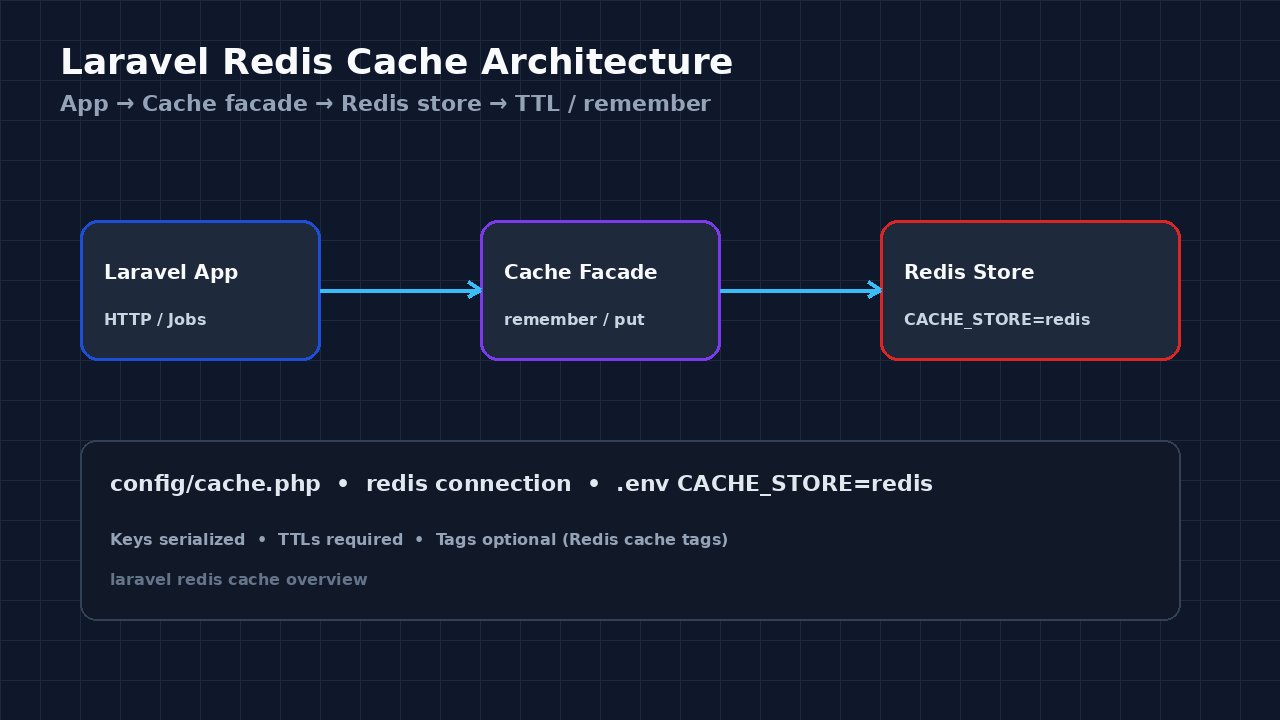
Laravel apps often hit the database on every request for data that barely changes. A solid laravel redis cache setup moves those reads behind Redis so controllers and jobs stay fast without changing your domain model. This guide walks through Redis caching Laravel end to end: driver config, CACHE_STORE, the Cache facade (remember, put, forget), TTLs, tags, and verification with real commands.
The Problem: Slow Reads Without a Laravel Redis Cache
Without a dedicated cache layer, every page render can re-run the same Eloquent queries, rebuild expensive aggregates, or call remote APIs again. File or database cache stores work for small apps, but they do not match Redis for shared, low-latency caching across multiple PHP-FPM or Octane workers. Teams also confuse Redis-as-queue with Redis-as-cache and end up sharing one connection with the wrong eviction story. For when Redis is (and is not) the right tool, see Redis caching: when you should and should not use it.
The goal here is practical cache optimization: wire Redis as Laravel's cache store, wrap hot reads in Cache::remember, expire keys deliberately, and invalidate on writes so stale data does not linger.
Symptoms When Redis Caching Laravel Is Missing or Misconfigured
php artisan config:show cache.defaultstill reportsdatabaseorfilein production..envhasREDIS_HOSTfor queues butCACHE_STORE(or legacyCACHE_DRIVER) is notredis.- Identical queries appear repeatedly in Telescope, Debugbar, or slow-query logs for the same keys.
Cache::get('…')always returnsnull; RedisKEYS/SCANshow nolaravel_cache:(or configured prefix) entries.- After deploy, workers disagree on cached values because some still use the file store on local disk.
- Intermittent
Connection refusedon cache calls — often the same class of issue as a plain Redis connection refused misconfig.
Root Cause: Driver, Connection, or Key Lifecycle Gaps
Most failures fall into three buckets:
- Wrong store. Redis is installed for Horizon/queues, but the cache store still points at
fileordatabase. Laravel only uses Redis for cache when the default store (or an explicitCache::store('redis')) is configured for it. - Incomplete Redis connection. Missing
phpredis/ predis client, badREDIS_HOST/REDIS_PORT/REDIS_PASSWORD, or TLS settings that work for CLI but not for PHP-FPM. - No TTL or invalidation. Keys written forever fill Redis (see Redis memory optimization), or writes never call
forget/tags()->flush(), so readers see stale payloads. Uncoordinated expiry can also cause a cache stampede.
Step-by-Step Solution: Implement Laravel Redis Cache
Step 1: Install and confirm the Redis PHP client
Prefer the phpredis extension in production. Confirm it loads:
php -m | grep -i redis
php -r 'var_export(extension_loaded("redis"));'
If you use Predis instead, ensure predis/predis is in composer.json and REDIS_CLIENT=predis is set. Either client works with Laravel's Redis manager; pick one and keep it consistent across app servers.
Step 2: Configure Redis in config/database.php and .env
Laravel's Redis connections live under config/database.php → redis. Typical .env:
REDIS_CLIENT=phpredis
REDIS_HOST=127.0.0.1
REDIS_PASSWORD=null
REDIS_PORT=6379
REDIS_DB=0
REDIS_CACHE_DB=1
Using a separate REDIS_CACHE_DB (or a dedicated cache connection) keeps cache keys off the default DB used by queues. That separation matters for eviction and for ops clarity next to Laravel queue Redis.
Step 3: Point the cache store at Redis
In modern Laravel, set:
CACHE_STORE=redisOlder apps may still use CACHE_DRIVER=redis — match whatever your Laravel version's config/cache.php reads. In config/cache.php, the redis store should reference the cache Redis connection, for example:
'stores' => [
    'redis' => [
        'driver' => 'redis',
        'connection' => 'cache',
        'lock_connection' => 'default',
    ],
],
Then clear and rebuild config so PHP-FPM picks it up:
php artisan config:clear
php artisan config:cache
php artisan cache:clear
Step 4: Use the Cache facade for Redis caching Laravel
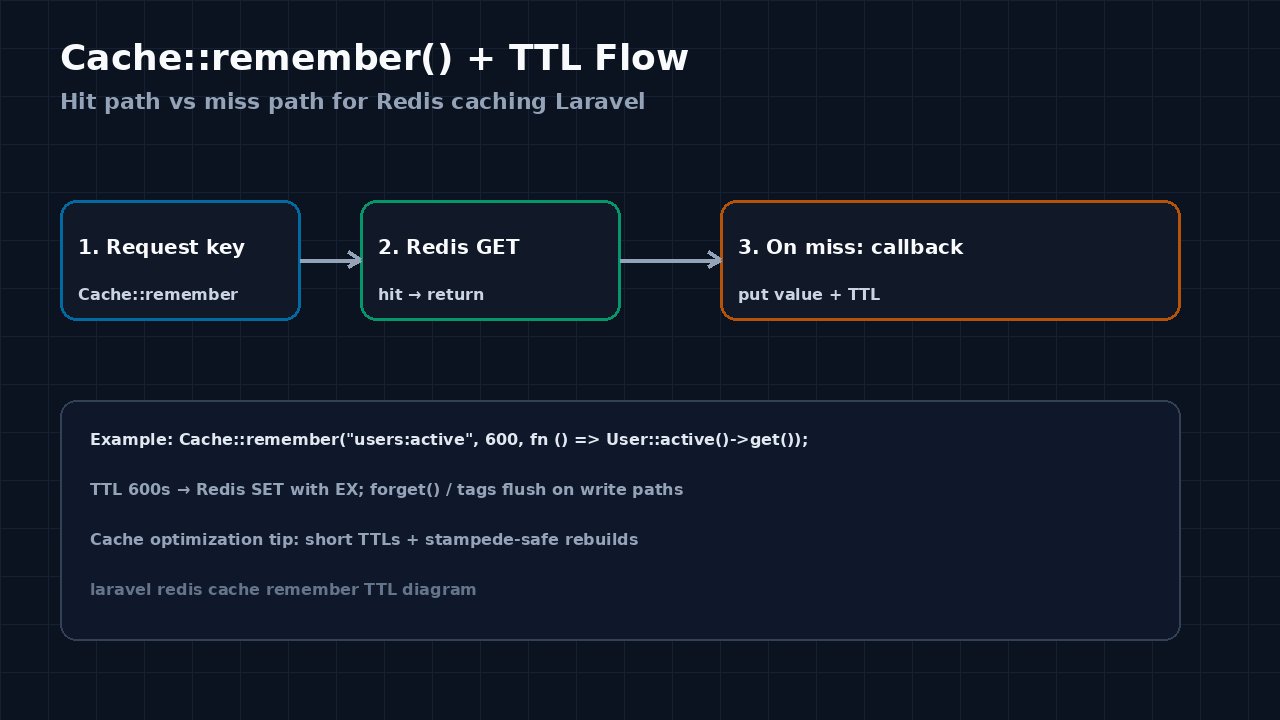
Prefer remember for read-through caching with a TTL:
use Illuminate\Support\Facades\Cache;

$users = Cache::remember('users:active', now()->addMinutes(10), function () {
    return User::query()->where('active', true)->get();
});
Explicit put/get/forget:
Cache::put('report:daily', $payload, 3600); // seconds
$value = Cache::get('report:daily');
Cache::forget('report:daily');
Cache::store('redis')->put('feature:flags', $flags, now()->addHour());
Laravel serializes values for you. Keep payloads JSON-friendly Eloquent collections/models in mind: caching full models can surprise you after schema changes; caching arrays/DTOs is often safer for cache optimization.
Step 5: Add cache tags when you need group invalidation
The Redis store supports tags (file/database stores do not in the same way):
Cache::tags(['products', 'catalog'])->remember('products:list', 600, fn () => Product::all());

// on write
Cache::tags(['products'])->flush();
Use tags for related key sets; still set TTLs so forgotten flush paths do not pin memory forever.
Step 6: Invalidate on writes
After creating/updating/deleting the source of truth, forget the keys or flush the tag. Pairing writes with invalidation is the difference between a helpful laravel redis cache and a source of confusing bugs.
Code/Commands for Laravel Redis Cache
# .env essentials
CACHE_STORE=redis
REDIS_CLIENT=phpredis
REDIS_HOST=127.0.0.1
REDIS_PORT=6379
REDIS_CACHE_DB=1

# Artisan checks
php artisan config:show cache.default
php artisan tinker
>>> Cache::store('redis')->put('ping', 'pong', 60);
>>> Cache::store('redis')->get('ping');

# redis-cli (adjust DB index)
redis-cli -n 1 PING
redis-cli -n 1 SCAN 0 MATCH '*ping*' COUNT 100
redis-cli -n 1 TTL laravel_cache_ping   # prefix may differ; inspect SCAN results

# Optional: dedicated remember helper in a service
Cache::remember('orders:open:count', 120, fn () => Order::open()->count());
Compare Redis vs a relational primary store when deciding what belongs in cache at all: Redis vs PostgreSQL.
Verification
config:show cache.defaultreturnsredis.- Tinker
put/getround-trip succeeds againstCache::store('redis'). redis-clion the cache DB shows the key (respecting Laravel's prefix) with a positive TTL afterremember/put.- Repeating the same request no longer repeats the heavy query in your query log while the TTL is live.
- After
forgetor tagflush, the next request rebuilds once and caches again. - Queue workers and web nodes share the same Redis cache connection settings so they see the same keys.
Prevention and Cache Optimization Habits
- Keep
CACHE_STORE=redisin production env templates; fail CI if staging still usesfile. - Always pass a TTL (or use
rememberwith an expiry). Eternal keys fight memory limits. - Namespace keys clearly (
users:active,products:list:v2) and bump versions when payload shape changes. - Invalidate on write paths; do not rely on short TTLs alone for correctness-critical data.
- Separate cache Redis DB/instance from queues when eviction policies differ.
- Watch hit/miss metrics and stampede risk when many keys share one expiry instant.
- Document which features use tags vs single-key
forgetso the next developer does not invent a second cache layout.
FAQs
What is the simplest laravel redis cache setup?
Install phpredis, set Redis host env vars, set CACHE_STORE=redis, point the redis cache store at your cache connection, then wrap hot reads with Cache::remember($key, $ttl, $callback).
How do I do Redis caching Laravel with an explicit store?
Call Cache::store('redis')->remember(...) (or put/get). That bypasses whatever the default store is and is useful while migrating from file to Redis.
Does CACHE_STORE replace CACHE_DRIVER?
On current Laravel versions the env key is CACHE_STORE. Older apps used CACHE_DRIVER. Check config/cache.php for env('CACHE_STORE', env('CACHE_DRIVER', 'database'))-style fallbacks and set the variable your version actually reads.
When should I use cache tags?
Use tags when many keys must invalidate together (for example a whole catalog). They require a store that supports tagging — Redis does; the file driver does not. Still set TTLs for cache optimization and safety.
Why is my cached value missing in redis-cli?
Laravel prefixes keys (see config/cache.php prefix) and may use a different Redis DB than 0. SCAN the cache DB and search for your logical key suffix. Also confirm the app is not still writing to the file store.
Is Redis caching Laravel enough for every read?
No. Cache derived, expensive, or shared reads. Do not cache per-request private data without a solid key design, and do not treat Redis as your primary database — PostgreSQL (or similar) remains the source of truth.



Comments
Join the discussion. Replies load on demand, up to 5 levels.
0 threads
No comments yet
Be the first to start the conversation.