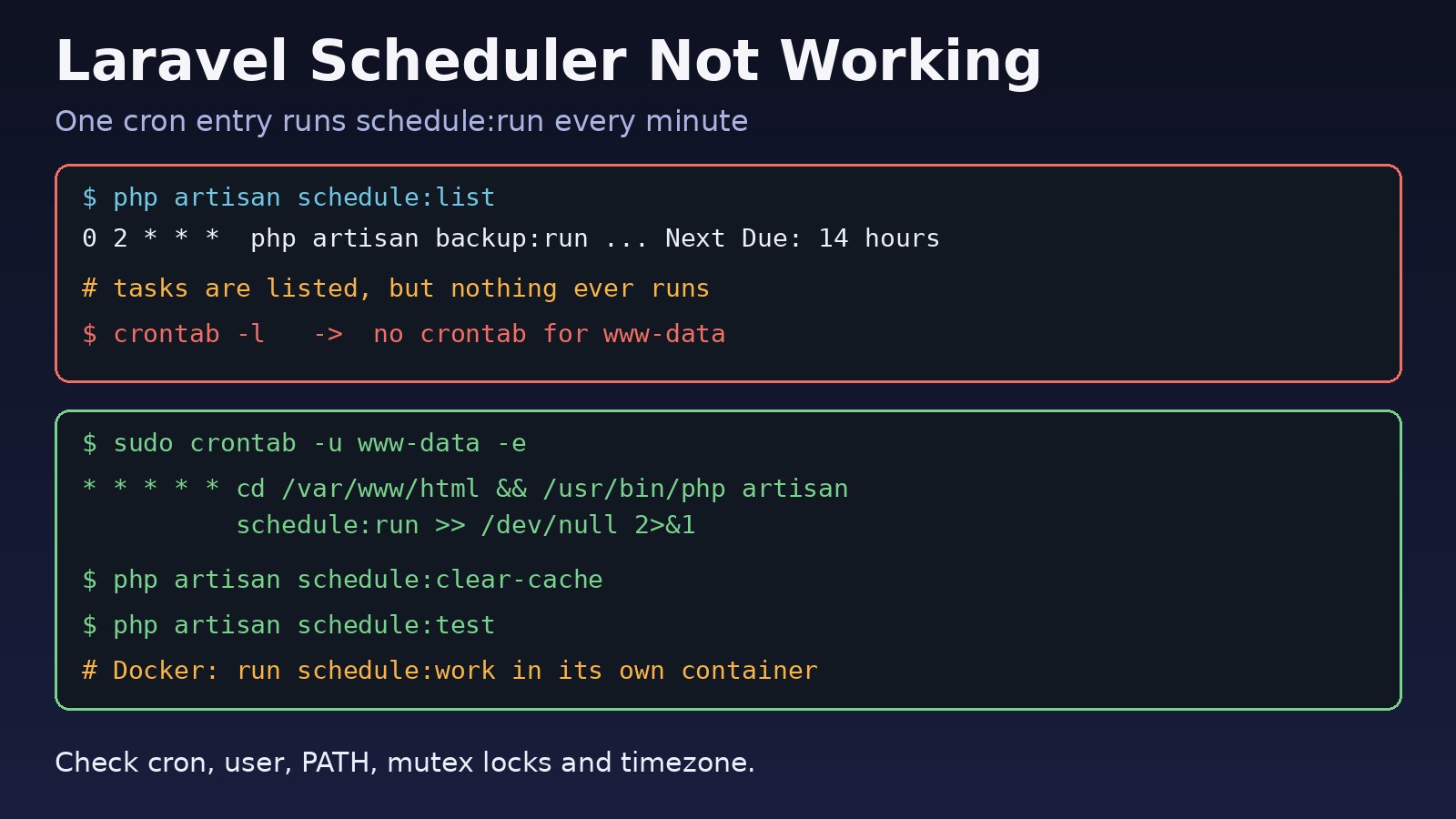
You added a task to the Laravel scheduler, it shows up in php artisan schedule:list, but the backup, report or cleanup job never actually runs. When the laravel scheduler not working problem appears, the cause is almost always outside your PHP code: the cron entry is missing, cron runs as the wrong user or cannot find php, a stale overlap lock blocks the task, or the timezone makes it run at a different hour than you expect. This guide walks through each layer, from cron to the task itself, with real commands you can run on Ubuntu servers and in Docker.
Problem: Laravel Scheduler Not Working
Laravel's task scheduler does not run by itself. It relies on a single system cron entry that calls php artisan schedule:run every minute. On each call, Laravel checks which tasks are due at that minute and runs them. If that one cron line is missing or broken, nothing scheduled will ever run, even though your schedule definitions are perfectly valid.
The problem typically shows up after moving to a new server, switching to Docker, upgrading to Laravel 11 (where schedule definitions moved), or deploying with a different system user than before.
Symptoms
php artisan schedule:listshows your tasks with a "Next Due" time, but the time passes and nothing happens.- Running the command by hand, for example
php artisan reports:daily, works fine. - A task ran once and then stopped completely, often after a server crash or a deploy that killed a running process.
- Tasks run, but at the wrong hour, usually offset by your UTC difference (for example five hours in Pakistan).
- The cron log shows the job firing, but there is no output and no sign of the task in
storage/logs. - Running
schedule:runprintsNo scheduled commands are ready to run.every time. - In a Docker setup, the scheduler worked locally with
schedule:workbut does nothing in production.
Root Cause of a Laravel Schedule Task Issue
No cron entry for schedule run
The most common cause. The crontab line was never added on the new server, it was added for root while the app expects www-data, or it was added to the wrong file, such as a user crontab on a different machine.
Cron cannot find PHP or the project
Cron runs with a minimal environment. PATH is usually just /usr/bin:/bin, there is no login shell and the working directory is the user's home. If PHP lives in /usr/local/bin, or you use a versioned binary such as php8.3, the command silently fails. The same happens if the line does not cd into the project or uses a relative path to artisan.
Wrong user and permissions
If cron runs as root, Laravel writes log and cache files owned by root, and later PHP-FPM requests fail. If it runs as a user without read access to .env or write access to storage, every run fails early. See How to Fix Laravel Storage Permission Denied Errors for the ownership side of this.
Stale withoutOverlapping mutex
->withoutOverlapping() stores a lock in the cache. If the process was killed (server reboot, OOM killer, deploy), the lock can remain until it expires. The default expiry is 24 hours, so the task is skipped for a full day.
onOneServer without a shared cache
->onOneServer() requires the default cache driver to be a central store such as redis, memcached, database or dynamodb. With the file or array driver, multiple servers cannot coordinate, and you may see tasks running twice or locks behaving unpredictably.
Timezone mismatch
The scheduler evaluates cron expressions in the timezone set in config/app.php ('timezone' => 'UTC' by default). A task defined with ->dailyAt('02:00') runs at 02:00 UTC, which is 07:00 in Asia/Karachi.
Laravel 11 routes/console.php vs app/Console/Kernel.php
Laravel 11 removed app/Console/Kernel.php from new projects. Schedules are defined in routes/console.php or with ->withSchedule() in bootstrap/app.php. If you copied a schedule() method into a Kernel class that the new skeleton no longer loads, nothing is registered.
Containers without cron
Official PHP Docker images do not include a cron daemon. If your container only runs PHP-FPM, nothing ever calls schedule:run.
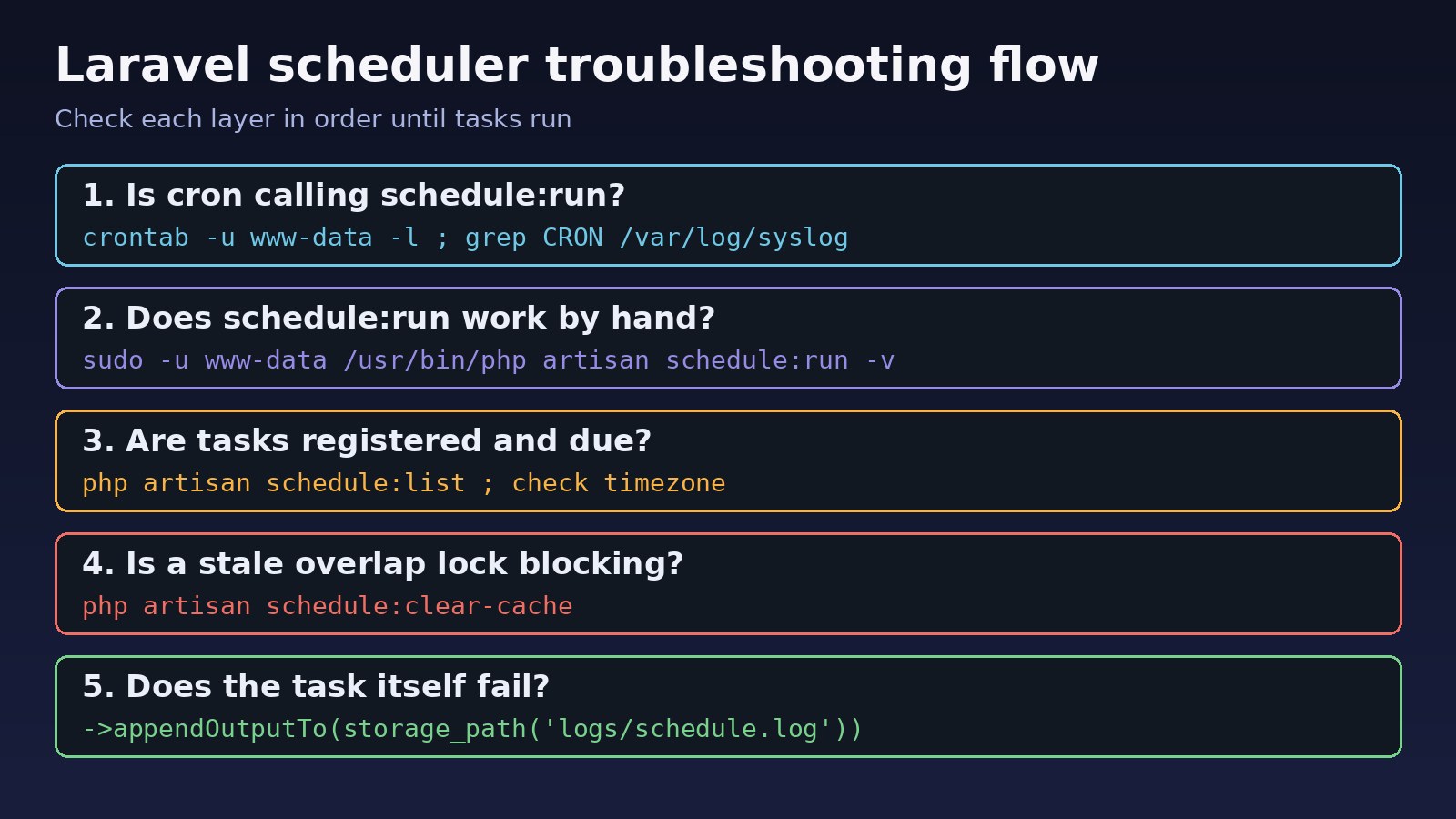
Step-by-Step Solution
Step 1: Confirm the schedule run cron entry exists
Check the crontab of the user that owns the application (usually www-data on Ubuntu, or your deploy user):
sudo crontab -u www-data -l
sudo crontab -l            # root's crontab
ls /etc/cron.d/
If there is no entry, add one. Use absolute paths for both PHP and the project:
which php            # e.g. /usr/bin/php
sudo crontab -u www-data -e

# add this single line
* * * * * cd /var/www/html && /usr/bin/php artisan schedule:run >> /dev/null 2>&1
You need only this one line no matter how many tasks you schedule. Do not add a separate cron line per task.
Step 2: Check that cron is running and firing
systemctl status cron                  # Debian/Ubuntu (crond on RHEL)
grep CRON /var/log/syslog | tail -n 20 # Ubuntu
journalctl -u cron --since "10 min ago"
You should see a CMD (cd /var/www/html && /usr/bin/php artisan schedule:run ...) line every minute. If not, start and enable the service with sudo systemctl enable --now cron.
Step 3: Run the scheduler by hand as the cron user
cd /var/www/html
sudo -u www-data /usr/bin/php artisan schedule:run -v
Errors that were hidden by >> /dev/null now appear on screen: permission errors on storage, a missing PHP extension, a database connection failure, or an exception in your task. Fix whatever shows up here before going further.
Step 4: Make sure tasks are registered and due
php artisan schedule:listIf the list is empty on Laravel 11 or 12, move your definitions into routes/console.php. If the "Next Due" time looks wrong, check the timezone (Step 6). To run one task immediately without waiting for its time, use:
php artisan schedule:test
# or pick by name
php artisan schedule:test --name="reports:daily"
Step 5: Clear stale overlap locks
If a task with withoutOverlapping() stopped after a crash or deploy, clear its mutex:
php artisan schedule:clear-cacheThen set a shorter lock expiry so a dead process cannot block the task for a whole day:
Schedule::command('reports:daily')
    ->hourly()
    ->withoutOverlapping(30); // lock expires after 30 minutes
If you use onOneServer(), confirm the default cache store is shared, for example CACHE_STORE=redis in Laravel 11+ or CACHE_DRIVER=redis in older versions. If Redis itself is unreachable, locks fail too; see Redis connection refused.
Step 6: Fix the timezone
Either set the app timezone in config/app.php (or APP_TIMEZONE in Laravel 11+), or set it per task:
Schedule::command('reports:daily')
    ->dailyAt('09:00')
    ->timezone('Asia/Karachi');
Many teams keep the app in UTC and use ->timezone() only on tasks tied to local business hours. Be careful with daylight saving zones, where a task can be skipped or run twice when clocks change.
Step 7: Run the scheduler in Docker
Instead of installing cron inside the PHP-FPM container, run a separate container from the same image using schedule:work, which runs the scheduler every minute in the foreground:
# docker-compose.yml
services:
  app:
    image: my-laravel-app
  scheduler:
    image: my-laravel-app
    command: php artisan schedule:work
    restart: unless-stopped
    depends_on:
      - app
Keep only one scheduler container per environment, or use onOneServer() with Redis if you must run several.
Step 8: Use Supervisor where cron is not available
; /etc/supervisor/conf.d/laravel-scheduler.conf
[program:laravel-scheduler]
command=/usr/bin/php /var/www/html/artisan schedule:work
user=www-data
autostart=true
autorestart=true
stdout_logfile=/var/www/html/storage/logs/scheduler.log
redirect_stderr=truesudo supervisorctl reread
sudo supervisorctl update
sudo supervisorctl status laravel-schedulerCode/Commands Examples
Laravel 11+ schedule in routes/console.php
<?php

use Illuminate\Support\Facades\Schedule;

Schedule::command('backup:run')
    ->dailyAt('02:00')
    ->timezone('Asia/Karachi')
    ->withoutOverlapping(60)
    ->onOneServer()
    ->appendOutputTo(storage_path('logs/backup.log'));

Schedule::command('reports:send')
    ->everyFifteenMinutes()
    ->runInBackground()
    ->sendOutputTo(storage_path('logs/reports-latest.log'));
appendOutputTo() keeps a running log, while sendOutputTo() overwrites the file each run. runInBackground() lets long tasks start without delaying other tasks due at the same minute; it only works with command() and exec() tasks.
Laravel 10 and older: app/Console/Kernel.php
protected function schedule(Schedule $schedule): void
{
    $schedule->command('backup:run')
        ->dailyAt('02:00')
        ->withoutOverlapping(60)
        ->appendOutputTo(storage_path('logs/backup.log'));
}
Debugging cron line that logs output
While troubleshooting, send cron output to a file instead of /dev/null, then switch back once it works:
* * * * * cd /var/www/html && /usr/bin/php artisan schedule:run >> /var/www/html/storage/logs/cron.log 2>&1Hooks to detect failures
Schedule::command('reports:send')
    ->daily()
    ->onFailure(function () {
        logger()->error('reports:send scheduled task failed');
    });
For heavy work, let the scheduled command dispatch a job and let queue workers do the processing. The worker setup is covered in Laravel queues with Redis.
Verification
grep CRON /var/log/syslogshows theschedule:runcommand every minute.sudo -u www-data /usr/bin/php artisan schedule:run -vfinishes without errors and runs due tasks.php artisan schedule:listshows the expected "Next Due" times in your intended timezone.- The log files from
appendOutputTo()get new entries at the scheduled times. - In Docker,
docker compose logs -f schedulershows tasks starting each minute they are due.
A quick end-to-end test: add a temporary task such as Schedule::call(fn () => logger('scheduler alive'))->everyMinute();, wait two minutes, check storage/logs/laravel.log, then remove it.
Prevention
- Put the crontab line (or the Supervisor or Docker scheduler service) into your server provisioning or infrastructure code, not into manual notes.
- Always use absolute paths to PHP and the project in the cron line.
- Run cron, queue workers and PHP-FPM as the same system user.
- Give every
withoutOverlapping()an expiry close to the task's maximum runtime. - Use Redis or another shared cache when using
onOneServer()across multiple servers. - Log output with
appendOutputTo()and addonFailure()alerts for important jobs. - After upgrading to Laravel 11, run
php artisan schedule:listto confirm your tasks still load.
FAQs
Why is my laravel scheduler not working even though schedule:list shows tasks?
schedule:list only reads your definitions. It does not mean anything is calling the scheduler. Check that a cron entry runs php artisan schedule:run every minute as the right user.
What is the correct schedule run cron line?
* * * * * cd /path-to-your-project && php artisan schedule:run >> /dev/null 2>&1. Use the full path to PHP (for example /usr/bin/php) if cron cannot find it.
How do I fix a Laravel schedule task issue where a job stopped after a crash?
The task probably uses withoutOverlapping() and left a stale lock. Run php artisan schedule:clear-cache and set a lock expiry such as withoutOverlapping(30).
What is the difference between schedule:run and schedule:work?
schedule:run checks due tasks once and exits, so it needs cron. schedule:work stays in the foreground and runs the scheduler every minute, which suits local development, Docker containers and Supervisor.
Why do my scheduled tasks run at the wrong time?
The scheduler uses the timezone in config/app.php, which defaults to UTC. Change the app timezone or add ->timezone('Asia/Karachi') to the task.
Where do I define schedules in Laravel 11?
In routes/console.php using the Schedule facade, or with withSchedule() in bootstrap/app.php. New Laravel 11 projects do not include app/Console/Kernel.php.



Comments
Join the discussion. Replies load on demand, up to 5 levels.
0 threads
No comments yet
Be the first to start the conversation.