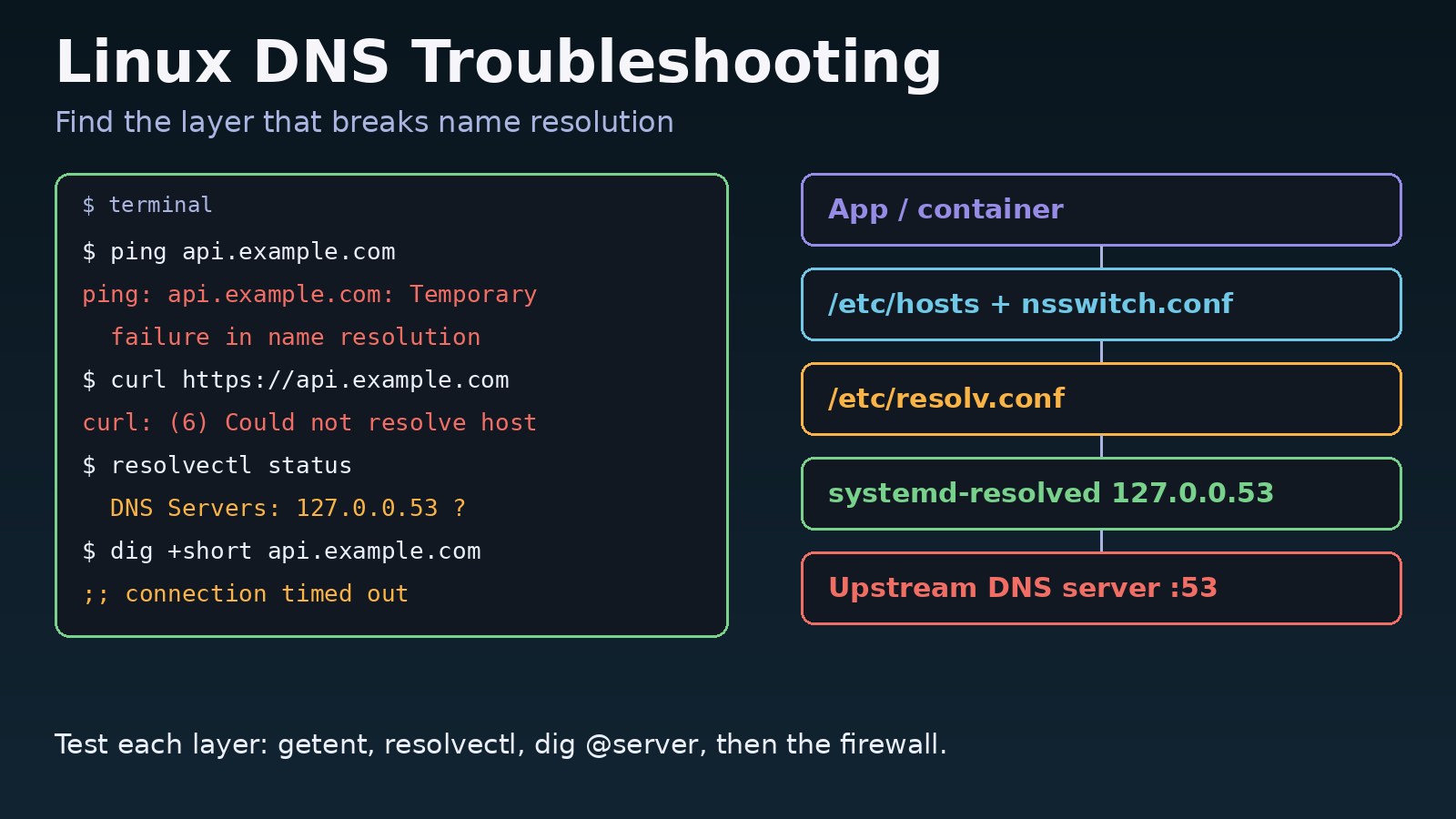
When a Linux server suddenly cannot reach api.example.com, apt update fails, or your Laravel app cannot find its Redis host, the cause is usually name resolution, not the network itself. This guide to linux dns troubleshooting walks through the resolver chain layer by layer, from /etc/hosts and resolv.conf to systemd-resolved, the upstream DNS server, firewalls and Docker containers, with the exact commands and error messages you will see.
Problem: DNS Lookup Failed on Linux
Every program that connects by hostname asks the system resolver (glibc) to turn the name into an IP address. glibc reads /etc/nsswitch.conf to decide the order of sources, usually files (/etc/hosts) and then dns. For DNS it reads the nameservers in /etc/resolv.conf. On modern Ubuntu and Debian that file points at the local systemd-resolved stub on 127.0.0.53, which in turn forwards queries to the real upstream servers from DHCP, Netplan or NetworkManager.
A failure in any one of these layers produces the same vague symptom: the hostname does not resolve. The trick is to test each layer separately so you know which one to fix, instead of editing files at random.
Symptoms
ping: api.example.com: Temporary failure in name resolution(the resolver got no answer, often a timeout).ping: api.example.com: Name or service not known(the name does not exist or no source could resolve it).curl: (6) Could not resolve host: api.example.comTemporary failure resolving 'archive.ubuntu.com'duringapt update.- Node.js logs
Error: getaddrinfo ENOTFOUND api.example.comorgetaddrinfo EAI_AGAIN. - PHP and Laravel show
php_network_getaddresses: getaddrinfo for redis failed: Name or service not known. digprints;; connection timed out; no servers could be reached, or returnsstatus: SERVFAILorstatus: NXDOMAIN.ping 1.1.1.1works butping google.comdoes not.
Root Cause: Where Linux Name Resolution Breaks
Wrong or empty resolv.conf
/etc/resolv.conf may have no nameserver line, point at a server that no longer exists (an old office DNS or a VPN resolver), or be a broken symlink after systemd-resolved was disabled. Some tools and cloud-init scripts overwrite it on reboot.
systemd-resolved has no upstream servers
The stub on 127.0.0.53 is only a forwarder. If DHCP did not hand out DNS servers, or Netplan has no nameservers block, resolvectl status shows no "DNS Servers" for the interface and every query fails.
Upstream DNS server is down or blocked
A firewall, cloud security group or corporate network may block outbound UDP and TCP port 53. Large responses also need TCP 53, so allowing only UDP can cause random failures.
Bad local overrides
A stale entry in /etc/hosts or a changed hosts: line in /etc/nsswitch.conf can send lookups to the wrong IP or skip DNS entirely.
Container and DNSSEC edge cases
Docker containers get their own resolv.conf. On user-defined networks they use Docker's embedded DNS at 127.0.0.11, and service names only resolve on the same network. systemd-resolved with DNSSEC enabled can also reject answers from a resolver that does not support it.
Step-by-Step Solution: Linux DNS Troubleshooting
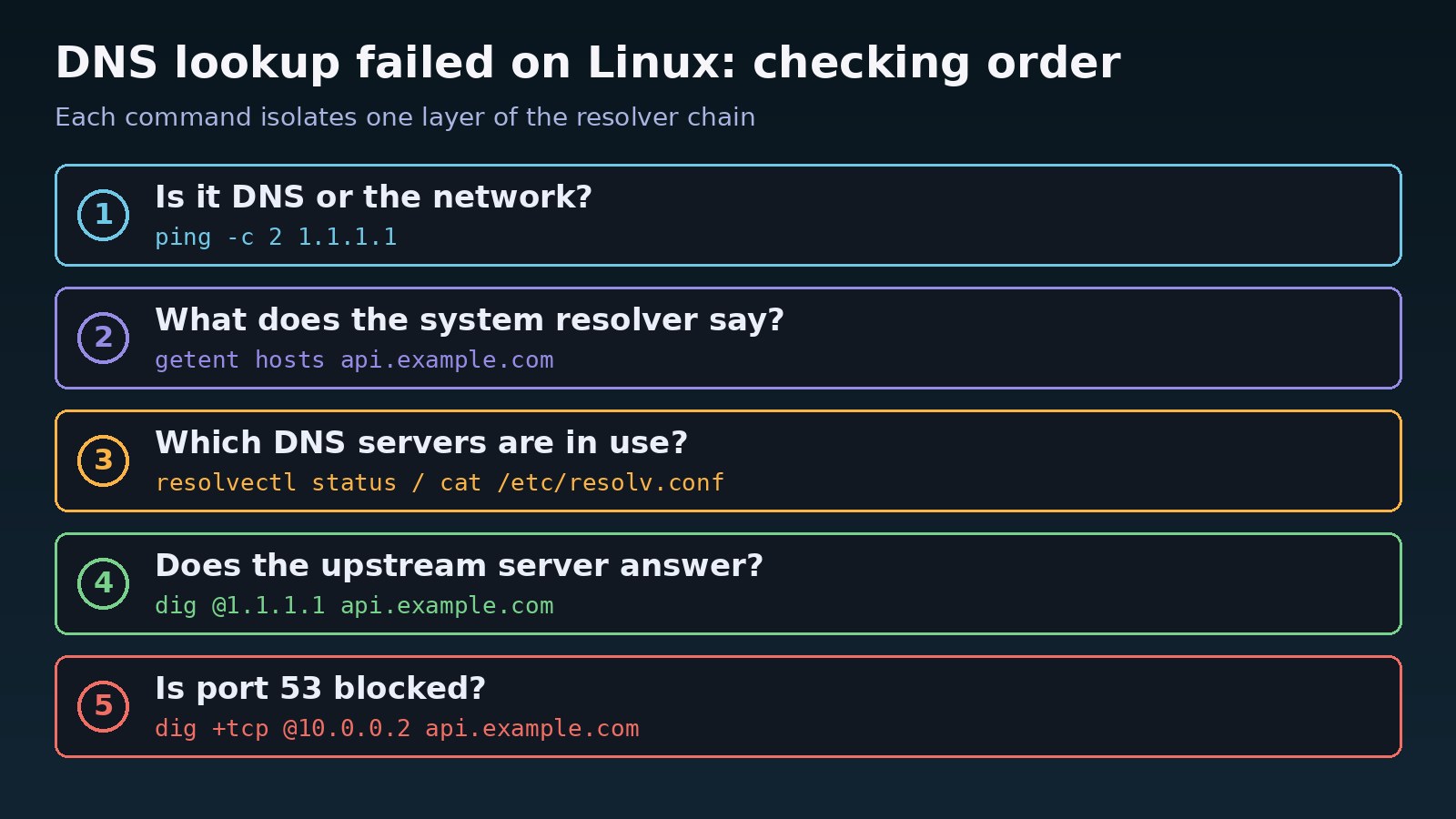
Step 1: Confirm it is DNS and not the network
Ping an IP address directly. If ping -c 2 1.1.1.1 fails, you have a routing or connectivity problem, not DNS. If the IP works but names fail, continue.
Step 2: Test the system resolver with getent
getent hosts uses the same glibc path as your applications, including /etc/hosts. dig and nslookup bypass /etc/hosts and nsswitch, so a name can work in dig and still fail in your app.
Step 3: Check which DNS servers are in use
Read /etc/resolv.conf, see whether it is a symlink, and run resolvectl status to see the real upstream servers per interface.
Step 4: Query the upstream server directly
Use dig @server against the configured upstream and against a public resolver. If the public one answers and yours does not, the configured server is the problem.
Step 5: Check for blocked port 53
Test UDP and TCP queries and review outbound firewall rules on the host and in the cloud provider.
Step 6: Fix the configuration permanently
Set nameservers in Netplan, NetworkManager or systemd-resolved instead of hand-editing a generated resolv.conf, then flush caches.
Code/Commands Examples
Separate network problems from DNS problems
ping -c 2 1.1.1.1          # works?  -> network is fine
ping -c 2 api.example.com  # fails?  -> name resolution problem
getent hosts api.example.com   # what your apps actually see
getent ahosts api.example.com  # IPv4 and IPv6 results
Inspect resolv.conf and systemd-resolved
ls -l /etc/resolv.conf
# /etc/resolv.conf -> ../run/systemd/resolve/stub-resolv.conf
cat /etc/resolv.conf
# nameserver 127.0.0.53
# options edns0 trust-ad

systemctl status systemd-resolved
resolvectl status          # look for "Current DNS Server" and "DNS Servers"
resolvectl query api.example.com
grep '^hosts:' /etc/nsswitch.conf
# hosts: files dns   (or: files mdns4_minimal [NOTFOUND=return] dns)
If resolv.conf is a dangling symlink, restore it with sudo ln -sf ../run/systemd/resolve/stub-resolv.conf /etc/resolv.conf and restart systemd-resolved.
Query DNS servers directly with dig
dig api.example.com                 # uses resolv.conf (127.0.0.53)
dig @10.0.0.2 api.example.com       # the upstream server from resolvectl
dig @1.1.1.1 api.example.com        # a public resolver for comparison
dig +short api.example.com A
dig +tcp @10.0.0.2 api.example.com  # does DNS over TCP 53 work?

# read the header line
# ;; ->>HEADER<<- opcode: QUERY, status: NOERROR   -> answer received
# status: NXDOMAIN  -> the name does not exist (typo or missing record)
# status: SERVFAIL  -> resolver failed (upstream or DNSSEC problem)
# ;; connection timed out; no servers could be reached -> server down or port 53 blocked
Set DNS servers permanently
# Netplan (Ubuntu Server): /etc/netplan/50-cloud-init.yaml
network:
  version: 2
  ethernets:
    eth0:
      dhcp4: true
      nameservers:
addresses: [1.1.1.1, 8.8.8.8]sudo netplan apply
# NetworkManager (desktops, RHEL, Rocky, Alma)
nmcli con show
sudo nmcli con mod "Wired connection 1" ipv4.dns "1.1.1.1 8.8.8.8" ipv4.ignore-auto-dns yes
sudo nmcli con up "Wired connection 1"
# systemd-resolved global fallback: /etc/systemd/resolved.conf
# [Resolve]
# DNS=1.1.1.1 8.8.8.8
sudo systemctl restart systemd-resolved
sudo resolvectl flush-cachesCheck firewall rules for port 53
sudo ufw status verbose
sudo ufw allow out 53/udp
sudo ufw allow out 53/tcp
sudo iptables -L OUTPUT -n -v --line-numbers | grep -E 'dpt:53|DROP|REJECT'
DNS inside Docker containers
docker exec -it app cat /etc/resolv.conf
# nameserver 127.0.0.11   <- Docker embedded DNS on user-defined networks
docker exec -it app getent hosts redis
docker network inspect myapp_default --format '{{range .Containers}}{{.Name}} {{end}}'

# set DNS for one container
docker run --dns 1.1.1.1 --rm busybox nslookup api.example.com

# or for all containers: /etc/docker/daemon.json
# { "dns": ["1.1.1.1", "8.8.8.8"] }
sudo systemctl restart docker
If a Laravel or Next.js container cannot resolve redis or postgres, make sure both services are on the same Compose network and use the service name, not localhost. A container that crashes on startup because of this can end up in a restart loop; see Docker container keeps restarting. For Redis-specific errors after the name resolves, read How to Fix Redis Connection Refused Errors.
Verification
getent hosts api.example.comreturns the expected IP.resolvectl statuslists a "Current DNS Server" for the active interface.dig api.example.comshowsstatus: NOERRORwith an ANSWER section, using the local resolver.curl -sI https://api.example.comandsudo apt updaterun without resolve errors.- After a reboot,
/etc/resolv.confand the nameservers are still correct. - Inside containers,
docker exec app getent hosts redisreturns the service IP.
Prevention
- Configure DNS in one place (Netplan, NetworkManager or
resolved.conf) and never hand-edit a generatedresolv.conf. - Always configure at least two nameservers, ideally from different providers or zones.
- Keep outbound UDP and TCP 53 open in firewall-as-code scripts and cloud security groups.
- Avoid long-lived
/etc/hostsoverrides on servers; document any that must stay. - Add monitoring that checks name resolution of your critical hosts, not just ping by IP.
- In Docker Compose, put dependent services on a shared network and refer to them by service name.
If DNS resolves correctly but browsers still cannot connect, the problem has moved to the network or firewall; see How to Fix ERR_CONNECTION_TIMED_OUT in Chrome.
FAQs
What does "Temporary failure in name resolution" mean in Linux?
The resolver could not get an answer from any configured DNS server, usually because none are set, the server is unreachable, or port 53 is blocked. It does not mean the domain is missing.
How do I fix DNS lookup failed on Linux after a reboot?
Something regenerated or replaced /etc/resolv.conf. Set the nameservers in Netplan, NetworkManager or /etc/systemd/resolved.conf so the setting survives reboots, and check that the symlink is correct.
Should I edit resolv.conf directly?
Only on systems where no service manages it. On Ubuntu with systemd-resolved, manual edits are overwritten. Use resolvectl, Netplan or NetworkManager instead.
Why does dig work but my application cannot resolve the host?
dig talks to DNS directly and ignores /etc/hosts and nsswitch.conf. Test with getent hosts, which follows the same path as your app.
How do I flush the DNS cache on Linux?
With systemd-resolved, run sudo resolvectl flush-caches. If you use nscd or dnsmasq, restart that service instead.
Why can't my Docker container resolve other services?
Service names only resolve through Docker's embedded DNS on user-defined networks. Put the containers on the same network and use the service name.



Comments
Join the discussion. Replies load on demand, up to 5 levels.
0 threads
No comments yet
Be the first to start the conversation.