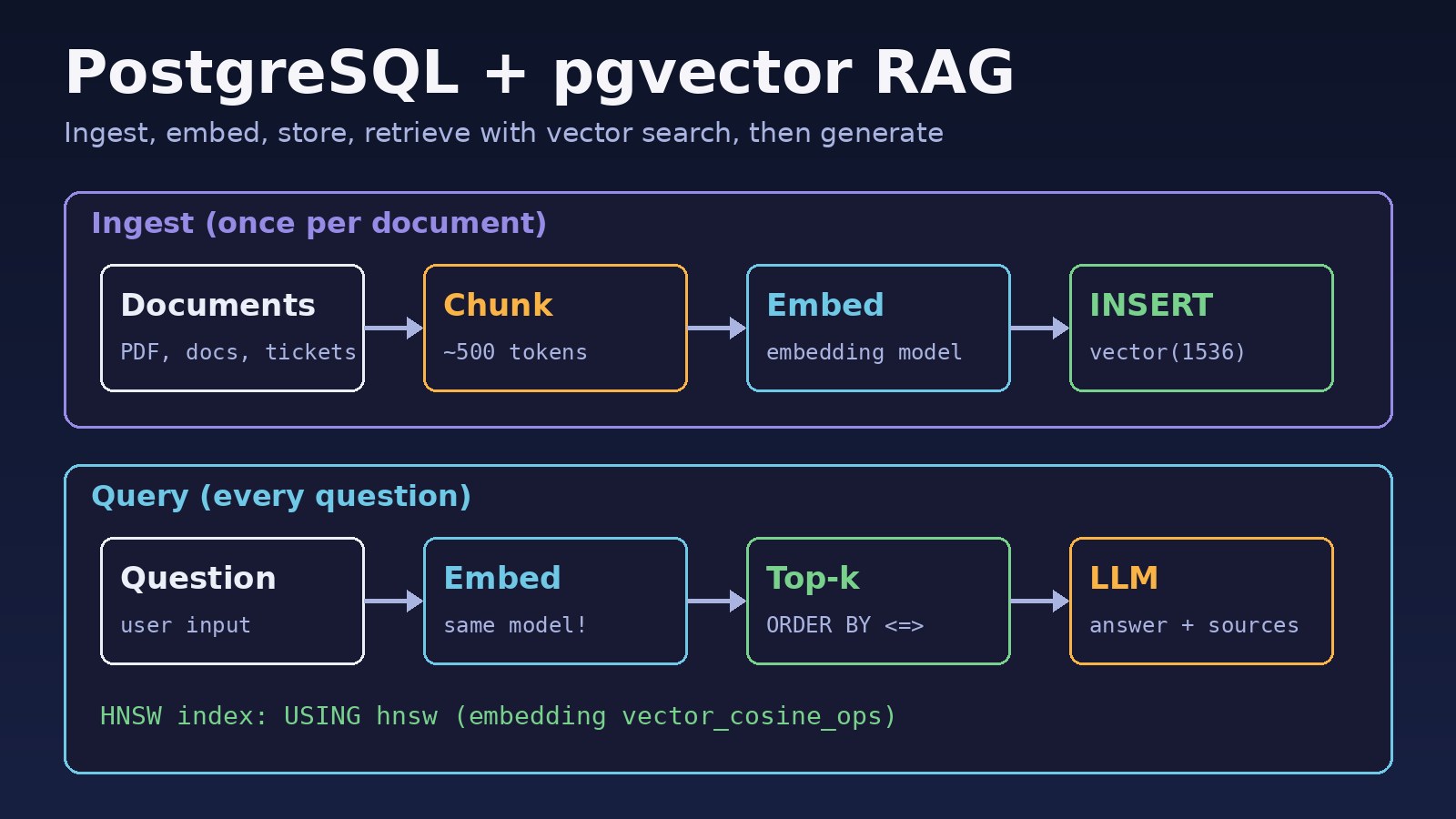
You want a chatbot or internal search that answers from your own documents, such as policies, ERP manuals, support tickets or API docs, and you already run Postgres. A postgresql pgvector rag setup lets you store embeddings next to your normal tables and retrieve the right chunks with plain SQL, with no separate vector database. The idea is simple, but the first build usually hits a few walls: the extension won't install, dimensions don't match, the index is ignored, or the model answers with confident nonsense because retrieval returned the wrong rows. This guide walks through a working RAG pipeline step by step and fixes the errors you are most likely to see.
Problem: Your RAG App Returns Wrong or Empty Context
Retrieval-Augmented Generation (RAG) has two halves. Ingestion splits documents into chunks, turns each chunk into an embedding vector and stores it. At query time you embed the user's question, find the nearest chunks with vector search and pass them to an LLM as context. If any step is wrong, the LLM still produces fluent text, so the bug often shows up as "the bot is making things up" rather than as an exception.
Symptoms
CREATE EXTENSION vector;fails withERROR: extension "vector" is not availableorcould not open extension control file ".../extension/vector.control": No such file or directory.- Creating the table fails with
ERROR: type "vector" does not exist. - Inserts fail with
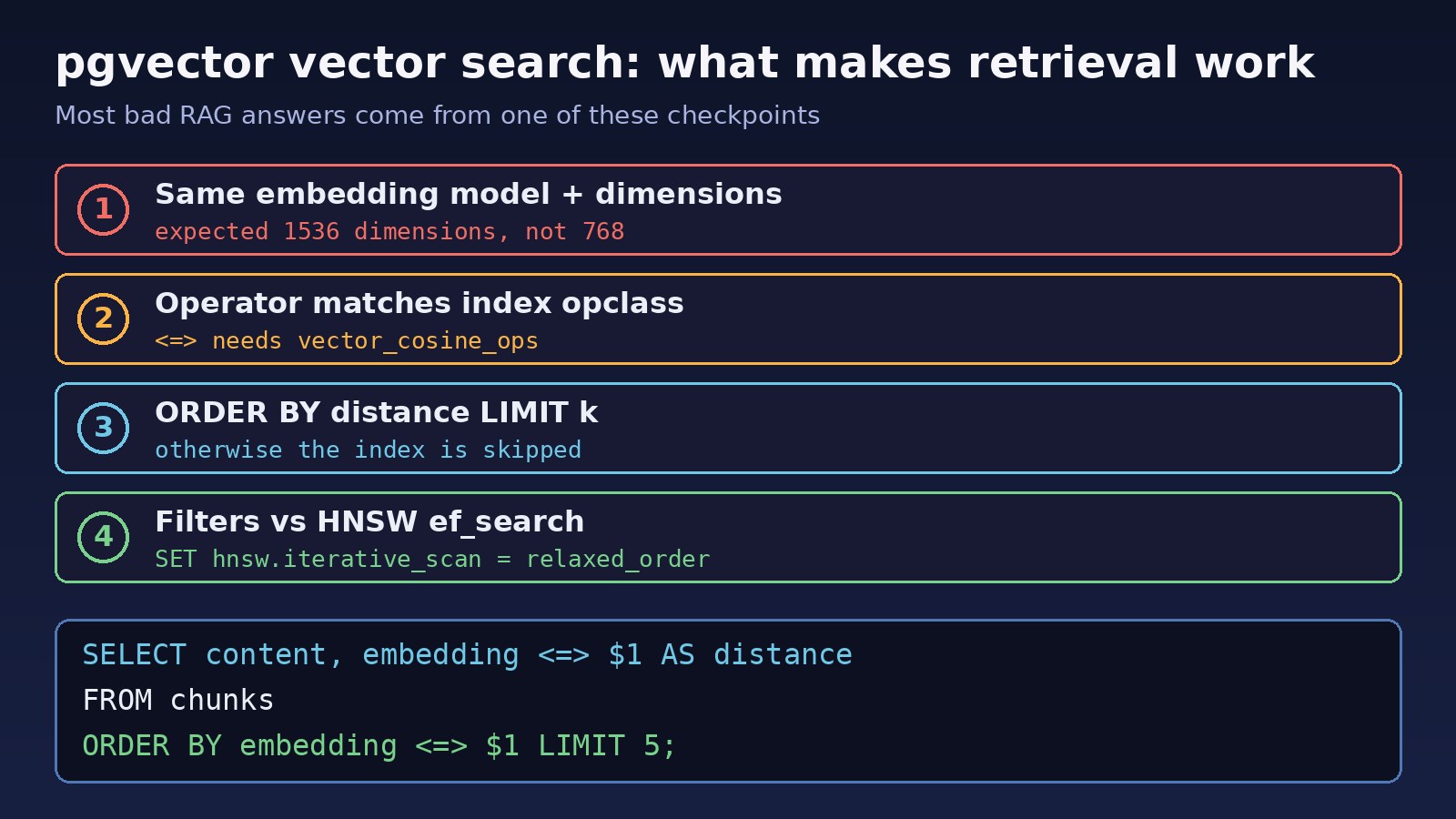
ERROR: expected 1536 dimensions, not 768, or queries fail withERROR: different vector dimensions 1536 and 768. - Index creation fails with
ERROR: column cannot have more than 2000 dimensions for hnsw index. - An index build prints
NOTICE: hnsw graph no longer fits into maintenance_work_mem after ... tuplesand runs for a long time. - Queries work but are slow, and
EXPLAINshows aSeq Scanon the chunks table. - A query with a
WHEREfilter returns fewer rows thanLIMIT, or none at all. - Answers ignore your documents or quote unrelated sections.
Root Cause: Why a PostgreSQL pgvector RAG Pipeline Breaks
- Extension not installed on the server. pgvector is a separate extension. The official
postgresDocker image does not include it, and on Linux you need the package that matches your major version. - Extension created in a different database.
CREATE EXTENSIONapplies per database, so creating it inpostgresdoesn't help your app database. - Embedding model mismatch. The column dimension is fixed, for example
vector(1536). Switching models, or embedding questions with a different model than the documents, breaks inserts or silently ruins similarity. - Operator and index don't match. An index built with
vector_cosine_opsis used only for the cosine operator<=>. Ordering by<->(L2) skips it. - Query shape. Approximate indexes are used for
ORDER BY embedding <=> $1 LIMIT k. WithoutORDER BY ... LIMIT, Postgres scans the table. - Filtering after the index scan. HNSW returns
hnsw.ef_searchcandidates (40 by default), and theWHEREclause is applied after that, so selective filters can leave few or no rows. - Bad chunks. Huge chunks dilute meaning; tiny chunks lose context. Retrieval quality depends more on chunking than on the database.
Step-by-Step Solution: RAG PostgreSQL Tutorial
Step 1: Install pgvector
With Docker, use the image that ships the extension instead of the plain postgres image:
# docker-compose.yml
services:
  db:
    image: pgvector/pgvector:pg16
    environment:
      POSTGRES_PASSWORD: secret
      POSTGRES_DB: rag
    ports:
      - "5432:5432"
    volumes:
      - pgdata:/var/lib/postgresql/data
volumes:
  pgdata:
On Debian or Ubuntu with the PostgreSQL apt repository, install the package for your major version, for example sudo apt install postgresql-16-pgvector. On managed services (RDS, Cloud SQL, Azure, Supabase, Neon) pgvector is usually available and only needs CREATE EXTENSION.
Step 2: Create the extension and schema in the app database
-- connect to the database your app uses, not "postgres"
CREATE EXTENSION IF NOT EXISTS vector;

CREATE TABLE documents (
  id         bigserial PRIMARY KEY,
  title      text NOT NULL,
  source_url text,
  tenant_id  bigint NOT NULL,
  created_at timestamptz NOT NULL DEFAULT now()
);

CREATE TABLE chunks (
  id          bigserial PRIMARY KEY,
  document_id bigint NOT NULL REFERENCES documents(id) ON DELETE CASCADE,
  tenant_id   bigint NOT NULL,
  chunk_index int    NOT NULL,
  content     text   NOT NULL,
  embedding   vector(1536) NOT NULL
);
Pick the dimension from your embedding model and record the model name somewhere (a column or config) so you never mix models in one column.
Step 3: Chunk and embed documents
Split text on headings and paragraphs into chunks of a few hundred tokens with a small overlap, so a sentence cut at a boundary still appears whole in one chunk. Store the title or section heading with each chunk; it helps both retrieval and citations. Embed in batches to cut API calls.
Step 4: Add an HNSW index for vector search
SET maintenance_work_mem = '1GB';   -- session only, speeds up the build
CREATE INDEX chunks_embedding_idx
  ON chunks USING hnsw (embedding vector_cosine_ops);
CREATE INDEX chunks_tenant_idx ON chunks (tenant_id);
HNSW (pgvector 0.5.0+) gives good recall without training and can be built on an empty table. IVFFlat builds faster and uses less memory, but it should be created after the data is loaded because it clusters existing rows. If you see the maintenance_work_mem notice, raise that setting for the session or build during off-peak hours.
Step 5: Retrieve the top-k chunks
SELECT c.content, d.title, d.source_url,
       c.embedding <=> $1 AS distance
FROM chunks c
JOIN documents d ON d.id = c.document_id
WHERE c.tenant_id = $2
ORDER BY c.embedding <=> $1
LIMIT 5;
<=> is cosine distance: 0 means same direction, and 1 - distance gives cosine similarity. Other operators are <-> (L2) and <#> (negative inner product). Use the same one in the query and the index.
Step 6: Generate the answer with sources
Put the retrieved chunks into the prompt with their titles, tell the model to answer only from that context and to say when the answer isn't there, and return the sources to the user. For more on keeping answers grounded, see how to reduce LLM hallucinations in business apps.
Code and Commands Examples
Python: ingest and query with psycopg and OpenAI
# pip install psycopg[binary] pgvector openai numpy
import os, numpy as np, psycopg
from pgvector.psycopg import register_vector
from openai import OpenAI

client = OpenAI()
conn = psycopg.connect(os.environ["DATABASE_URL"], autocommit=True)
register_vector(conn)  # needs CREATE EXTENSION vector first

EMBED_MODEL = "text-embedding-3-small"  # 1536 dimensions

def embed(texts):
    resp = client.embeddings.create(model=EMBED_MODEL, input=texts)
    return [np.array(d.embedding) for d in resp.data]

def ingest(doc_id, tenant_id, chunks):
    for i, (text, vec) in enumerate(zip(chunks, embed(chunks))):
        conn.execute(
            "INSERT INTO chunks (document_id, tenant_id, chunk_index, content, embedding) "
            "VALUES (%s, %s, %s, %s, %s)",
            (doc_id, tenant_id, i, text, vec),
        )

def retrieve(question, tenant_id, k=5):
    q = embed([question])[0]
    return conn.execute(
        "SELECT content, embedding <=> %s AS distance FROM chunks "
        "WHERE tenant_id = %s ORDER BY embedding <=> %s LIMIT %s",
        (q, tenant_id, q, k),
    ).fetchall()

def answer(question, tenant_id):
    context = "\n\n---\n\n".join(r[0] for r in retrieve(question, tenant_id))
    resp = client.chat.completions.create(
        model=os.environ["CHAT_MODEL"],
        messages=[
            {"role": "system", "content": "Answer only from the context. "
             "If the answer is not in the context, say you don't know."},
            {"role": "user", "content": f"Context:\n{context}\n\nQuestion: {question}"},
        ],
    )
    return resp.choices[0].message.content
Laravel: query pgvector with a bound parameter
use Illuminate\Support\Facades\DB;

// $embedding is an array of floats from your embedding API
$vector = '[' . implode(',', $embedding) . ']';

$chunks = DB::select(
    'SELECT content, embedding <=> ?::vector AS distance
       FROM chunks
      WHERE tenant_id = ?
      ORDER BY embedding <=> ?::vector
      LIMIT 5',
    [$vector, $tenantId, $vector]
);
pgvector accepts the text form '[0.1,0.2,...]', so binding a string and casting with ::vector works with Laravel's PostgreSQL driver without extra packages. Embedding calls are slow and rate limited, so run ingestion in queued jobs, not in the web request.
Fixing the common errors
-- extension "vector" is not available / type "vector" does not exist
SELECT name, default_version, installed_version
FROM pg_available_extensions WHERE name = 'vector';
-- no row: install the package or use pgvector/pgvector image
-- row but installed_version is NULL: run CREATE EXTENSION vector; in THIS database

-- expected 1536 dimensions, not 768
SELECT vector_dims(embedding), count(*) FROM chunks GROUP BY 1;
-- use one model for documents and questions; re-embed after a model change

-- column cannot have more than 2000 dimensions for hnsw index (e.g. 3072-dim model)
-- option 1: request fewer dimensions from the API (text-embedding-3 models support it)
-- option 2: index a half-precision expression
CREATE INDEX ON chunks USING hnsw ((embedding::halfvec(3072)) halfvec_cosine_ops);
-- then query with: ORDER BY embedding::halfvec(3072) <=> $1::halfvec(3072)

-- filtered queries returning too few rows
SET hnsw.ef_search = 100;                    -- default 40
SET hnsw.iterative_scan = relaxed_order;     -- pgvector 0.8.0+
Verification
- Check the extension version:
SELECT extversion FROM pg_extension WHERE extname = 'vector';Iterative scans need 0.8.0 or newer. - Run
EXPLAIN ANALYZEon the retrieval query and confirm it showsIndex Scan using chunks_embedding_idxinstead ofSeq Scan. On very small tables the planner may still choose a sequential scan, which is fine. For general plan reading, see how to optimize a slow PostgreSQL query step by step. - Build a small test set of 20 to 50 real questions with the chunk that should answer each, and check that chunk appears in the top 5. Rerun it after changing chunk size, model or index settings.
- Ask a question your documents don't cover and confirm the bot says it doesn't know.
- Compare results with and without the index (
SET enable_indexscan = off;in a test session) to see how much recall the approximate index costs.
Prevention
- Store the embedding model name with each chunk, and re-embed everything in a new column or table when you change models.
- Always filter by tenant or permission in SQL. Vector search does not know who is allowed to see a document.
- Keep ingestion idempotent: delete and re-insert a document's chunks inside one transaction when the source changes.
- Watch connection usage. Embedding workers and chat requests add up quickly; put PgBouncer in front of PostgreSQL if you see connection limits.
- Consider hybrid search: combine vector search with PostgreSQL full-text search (
tsvector) so exact terms like invoice numbers and error codes still match. - Pin the pgvector version in your Docker image tag and test upgrades, because new versions add operators and index options.
FAQs
Do I need a separate vector database for a PostgreSQL pgvector RAG app?
Not for most business apps. pgvector keeps embeddings, metadata and permissions in one database, so joins, transactions and backups work as usual. A dedicated vector database makes more sense at very large scale or when you need features pgvector doesn't have.
HNSW or IVFFlat for vector search?
Start with HNSW. It usually gives better recall at the same speed and doesn't need data before you build it. IVFFlat builds faster and uses less memory, but it needs to be created after loading data and may need rebuilding as data grows.
Which distance operator should I use?
Use the one your embedding model recommends. Cosine distance (<=>) is a safe default for text embeddings. Make the index operator class match it.
How big should chunks be in a RAG PostgreSQL tutorial setup?
A few hundred tokens with a small overlap is a common starting point. Measure retrieval with your own test questions and adjust; there is no single best size.
Why does my filtered vector search return fewer rows than LIMIT?
The HNSW index returns a fixed number of candidates and the filter runs afterwards. Increase hnsw.ef_search, enable hnsw.iterative_scan on pgvector 0.8.0+, or add a B-tree index on the filter column so the planner can choose it for very selective filters.
Can I change embedding models later?
Yes, but vectors from different models are not comparable. Add a new column with the new dimension, re-embed all chunks, build its index, then switch queries over.



Comments
Join the discussion. Replies load on demand, up to 5 levels.
0 threads
No comments yet
Be the first to start the conversation.