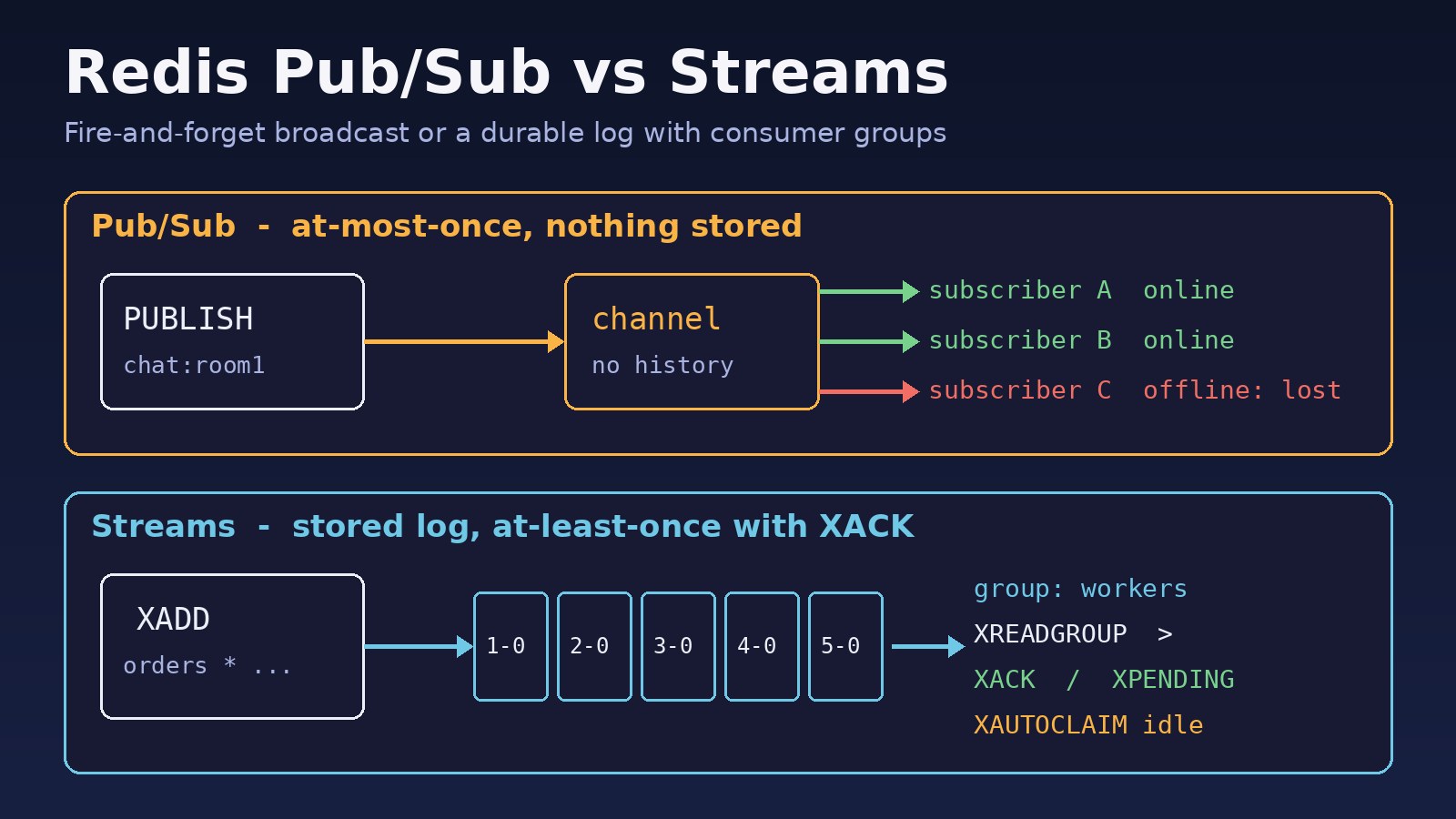
A notification goes missing after a deploy. An order event fires but the worker that should send the invoice never sees it. The worker was restarting at that moment, and Redis did not keep the message. Most of the time this comes down to picking the wrong tool, so it helps to understand redis pub sub vs streams before you wire them into a Laravel, Node.js or Next.js backend. Pub/Sub is a fire-and-forget broadcast. Streams are a stored, append-only log with consumer groups, acknowledgements and replay. This guide explains the differences, shows the real commands for both, and walks through moving lost-message workloads from Pub/Sub to Streams.
Problem: Messages Disappear When You Use the Wrong Redis Feature
Teams often start with PUBLISH and SUBSCRIBE because they are easy to set up. One service publishes on a channel, another subscribes, and it works in development. In production the same setup is used for work that must not be lost: payment callbacks, stock updates in an ERP, email jobs, webhook fan-out. Redis Pub/Sub was never meant to guarantee delivery for those cases. When a subscriber is down, slow or reconnecting, messages published during that time are gone.
Symptoms
- Events go missing during deploys, container restarts or network blips, with no error on the publisher side.
PUBLISHreturns(integer) 0, meaning no client was subscribed when the message was sent, so nobody received it.- A slow subscriber gets disconnected and the Redis log shows
Client id=... scheduled to be closed ASAP for overcoming of output buffer limits. - Code that reuses the subscriber connection for normal commands fails with
ERR Can't execute 'get': only (P|S)SUBSCRIBE / (P|S)UNSUBSCRIBE / PING / QUIT / RESET are allowed in this context. - After switching to Streams:
BUSYGROUP Consumer Group name already existson every app start,NOGROUP No such key 'orders' or consumer group 'workers' in XREADGROUP with GROUP option, or a pending list that keeps growing. - Two workers process the same Pub/Sub message, because every subscriber gets a copy. There is no way to share the load.
Root Cause: How Redis Pub/Sub vs Streams Handle Message Delivery
The two features look alike but follow different delivery rules.
Redis Pub/Sub: at-most-once broadcast
- Messages are not stored. Redis pushes each message to the clients subscribed at that moment and then forgets it.
- Every subscriber gets every message. There is no built-in way to split work between workers.
- There is no acknowledgement and no replay. A subscriber that reconnects starts from "now".
- Slow subscribers build up an output buffer. The default
client-output-buffer-limit pubsub 32mb 8mb 60disconnects them once the limit is passed.
Redis Streams: a stored log with at-least-once delivery
XADDappends an entry with an ID such as1729750000000-0. The entry stays until you trim or delete it.- Consumer groups share entries between workers. Each entry goes to one consumer in the group, and several groups can read the same stream on their own.
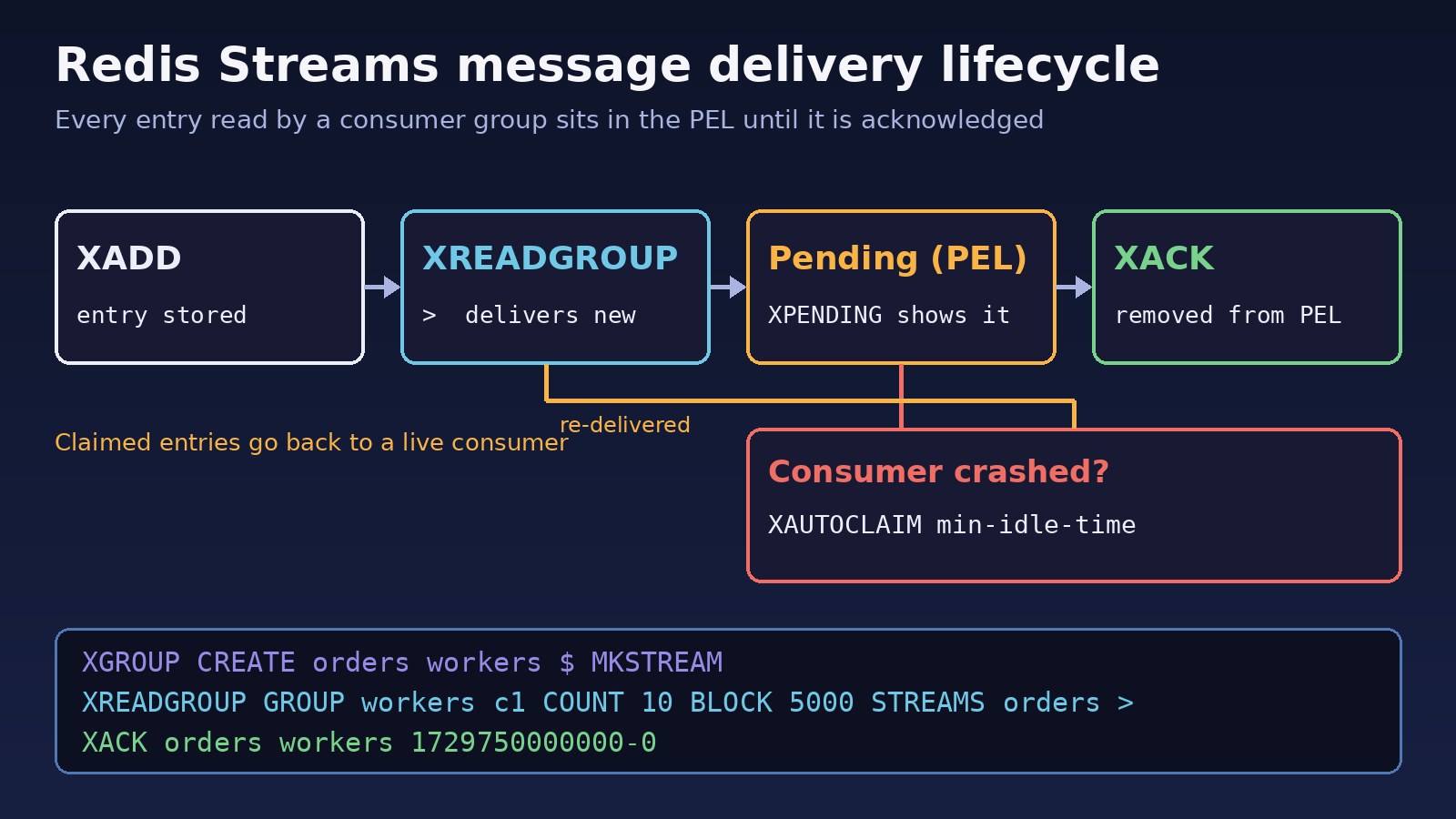
- Every delivered entry sits in the group's Pending Entries List (PEL) until the consumer calls
XACK. If a worker crashes, another can take over the entry withXAUTOCLAIM. - You can replay history with
XRANGEor by reading from an older ID.
Short version: use Pub/Sub when losing a message is acceptable, such as live typing indicators, cache invalidation hints or dashboard refresh pings. Use Streams when each message represents work that must be done.
Step-by-Step Solution: Moving Critical Events to Redis Streams
Step 1: Sort your channels into "can lose" and "must deliver"
List every channel your apps publish to. Keep Pub/Sub for broadcasts where only online clients matter (for example, events that a WebSocket server pushes to connected browsers). Move anything that triggers business work, like orders, payments, emails or stock movements, to a stream.
Step 2: Create the stream and consumer group once
127.0.0.1:6379> XGROUP CREATE orders workers $ MKSTREAM
OK
127.0.0.1:6379> XGROUP CREATE orders workers $ MKSTREAM
(error) BUSYGROUP Consumer Group name already exists
MKSTREAM creates the stream if it doesn't exist. $ means "only entries added after now"; use 0 to also process existing entries. Run this in a deploy step or migration, or catch BUSYGROUP in code and ignore it. Reading before the group exists gives the NOGROUP error.
Step 3: Produce with XADD and cap the length
127.0.0.1:6379> XADD orders MAXLEN ~ 100000 * order_id 5012 status paid
"1729750000000-0"
* lets Redis generate the ID. MAXLEN ~ 100000 trims old entries roughly, which is cheaper than an exact trim and keeps memory under control.
Step 4: Consume with XREADGROUP and acknowledge with XACK
127.0.0.1:6379> XREADGROUP GROUP workers c1 COUNT 10 BLOCK 5000 STREAMS orders >
1) 1) "orders"
   2) 1) 1) "1729750000000-0"
         2) 1) "order_id"
            2) "5012"
            3) "status"
            4) "paid"
127.0.0.1:6379> XACK orders workers 1729750000000-0
(integer) 1
The special ID > asks for entries never delivered to this group. Acknowledge only after the work succeeds. If the process dies before XACK, the entry stays pending.
Step 5: Recover stuck messages with XPENDING and XAUTOCLAIM
# Summary: count, smallest and largest pending ID, per-consumer counts
XPENDING orders workers

# Details: ID, consumer, idle time in ms, delivery count
XPENDING orders workers - + 10

# Give entries idle for more than 60 seconds to consumer c2
XAUTOCLAIM orders workers c2 60000 0-0 COUNT 10
XAUTOCLAIM (Redis 6.2+) returns a cursor to continue from, the claimed entries and, from Redis 7, IDs that were deleted in the meantime. Run it on a timer in each worker. When a worker restarts with the same consumer name, it can also read its own pending entries with STREAMS orders 0 before switching to >.
Code and Commands Examples
Pub/Sub with redis-cli
# Terminal 1
redis-cli SUBSCRIBE chat:room1
Reading messages... (press Ctrl-C to quit)
1) "subscribe"
2) "chat:room1"
3) (integer) 1

# Terminal 2
redis-cli PUBLISH chat:room1 "hello"
(integer) 1

# Pattern subscriptions and live channel stats
redis-cli PSUBSCRIBE "chat:*"
redis-cli PUBSUB CHANNELS
redis-cli PUBSUB NUMSUB chat:room1
The number returned by PUBLISH is how many clients received the message. In Redis Cluster, Redis 7 adds sharded Pub/Sub (SPUBLISH, SSUBSCRIBE) so messages stay on the shard that owns the channel instead of going to every node.
Laravel: Pub/Sub and Streams with phpredis
use Illuminate\Support\Facades\Redis;

// Publisher (anywhere in the app)
Redis::publish('chat:room1', json_encode(['user' => 7, 'text' => 'hi']));

// Subscriber: run inside a long-running artisan command
Redis::subscribe(['chat:room1'], function (string $message) {
    logger()->info('chat', json_decode($message, true));
});

// Streams with the phpredis client
Redis::xadd('orders', '*', ['order_id' => '5012', 'status' => 'paid']);

$batch = Redis::xreadgroup('workers', 'worker-1', ['orders' => '>'], 10, 5000);
foreach ($batch['orders'] ?? [] as $id => $fields) {
    // handle the order, then acknowledge
    Redis::xack('orders', 'workers', [$id]);
}
Method signatures above follow phpredis; Predis uses different argument orders for stream commands, so check your client. For plain background jobs, Laravel queues are usually the better choice; if those are stuck, see fixing Laravel queue jobs on Redis. A subscriber also needs a dedicated connection, because once a connection calls SUBSCRIBE it can only run subscription commands.
Node.js (ioredis): consumer group worker
import Redis from 'ioredis';
const redis = new Redis(process.env.REDIS_URL);

try {
  await redis.xgroup('CREATE', 'orders', 'workers', '$', 'MKSTREAM');
} catch (e) {
  if (!String(e.message).includes('BUSYGROUP')) throw e;
}

const consumer = `worker-${process.pid}`;
while (true) {
  const res = await redis.xreadgroup(
    'GROUP', 'workers', consumer, 'COUNT', 10, 'BLOCK', 5000, 'STREAMS', 'orders', '>'
  );
  if (!res) continue;                      // BLOCK timed out, nothing new
  for (const [, entries] of res) {
    for (const [id, fields] of entries) {
      await handleOrder(fields);           // must be idempotent
      await redis.xack('orders', 'workers', id);
    }
  }
}
A Pub/Sub subscriber in ioredis is a separate client: const sub = new Redis(); await sub.subscribe('chat:room1'); sub.on('message', (ch, msg) => ...). If browsers get those events through a WebSocket server and connections keep dropping, see WebSocket connection failed: causes and solutions.
Verification
- Stop all consumers, run
XADDa few times, start a consumer again and confirm it processes every entry. With Pub/Sub the same test loses those messages. - Run
XINFO GROUPS ordersand checkpending,last-delivered-idand, on Redis 7,lag. - Kill a worker mid-job (
docker killorkill -9), then confirmXPENDINGshows the entry andXAUTOCLAIMhands it to another worker. - Watch
XLEN ordersover a day to confirm trimming keeps the stream at the size you expect. - If workers can't reach Redis at all, fix that first with how to fix Redis connection refused errors.
Prevention
- Write down, per channel or stream, whether a lost message is acceptable. That one decision picks the feature.
- Make stream consumers idempotent. At-least-once delivery means a claimed entry can be processed twice, so check an order ID or use a unique database constraint.
- Always trim streams with
MAXLEN ~orMINID, and alert whenXPENDINGcounts or idle times keep rising. - Use stable consumer names per worker and remove dead ones with
XGROUP DELCONSUMERonce their pending entries are claimed. - Turn on persistence (
appendonly yes) if streams must survive a Redis restart. Streams live in memory like every other Redis key. - Use separate connections for subscribers and normal commands, and keep subscriber handlers fast so output buffers don't fill.
FAQs
What is the main difference in redis pub sub vs streams?
Pub/Sub delivers messages only to clients connected at that moment and stores nothing. Streams store entries in a log, so consumers can read later, share work in consumer groups and acknowledge each message.
Does Redis Pub/Sub guarantee message delivery?
No. It is at-most-once. If a subscriber is offline, slow or reconnecting, it misses messages and Redis gives no way to recover them.
What does a Redis Streams tutorial usually cover first?
XADD to write, XRANGE and XREAD to read, then XGROUP CREATE, XREADGROUP and XACK for consumer groups, and finally XPENDING and XAUTOCLAIM for recovery.
Is Redis Streams message delivery exactly-once?
No. It is at-least-once. An entry can be delivered again after a crash or claim, so handlers should be idempotent.
Can I use both in the same app?
Yes, and many apps do. Streams carry the work, and Pub/Sub pushes "something changed" hints to WebSocket servers or caches.
Should I use Redis Streams instead of Kafka?
For moderate volumes inside a stack that already runs Redis, Streams are often enough. When you need long retention on disk or very large replay windows, a dedicated log system is a better fit.



Comments
Join the discussion. Replies load on demand, up to 5 levels.
0 threads
No comments yet
Be the first to start the conversation.