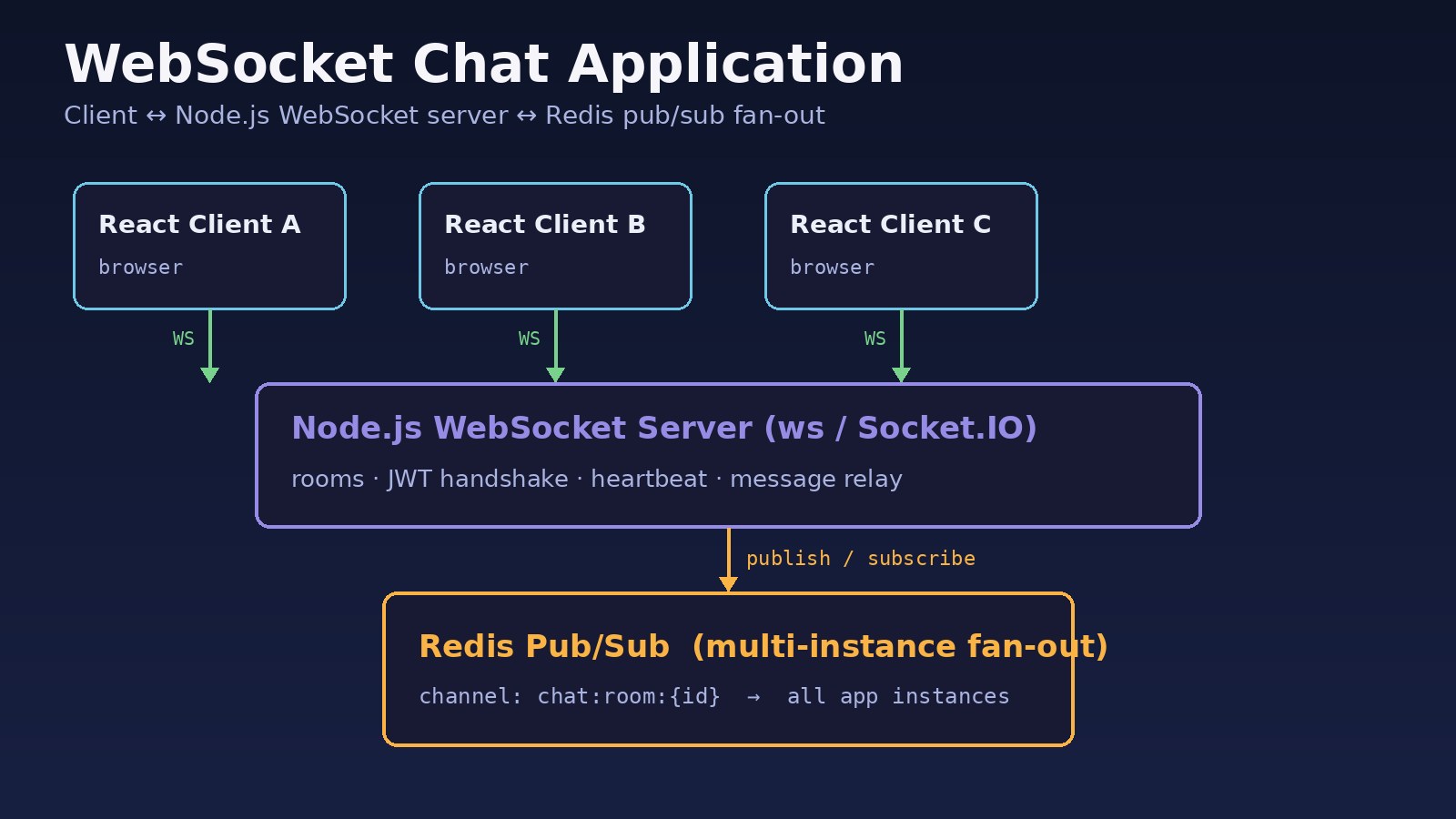
HTTP request/response is a poor fit for live messaging: polling wastes bandwidth, and long-polling still leaves awkward gaps. A websocket chat application keeps a persistent duplex channel so the server can push messages the instant they arrive. This guide builds a practical WebSocket React Node.js stack: ws or Socket.IO, rooms, JWT handshake, Redis pub/sub fan-out, reconnect, and heartbeat.
Problem: Why HTTP Polling Fails for a WebSocket Chat Application
Chat needs low latency both ways. Short polling hammers GET /messages?after=… even when a room is quiet; long-polling still pays a full HTTP round trip per message and fights proxy timeouts. SSE helps one-way push, but chat clients send as often as they receive.
WebSockets keep a duplex channel after the HTTP upgrade. The hard parts are auth, rooms, multi-process fan-out, and surviving drops—covered further in WebSocket connection failed and WebSocket reconnect.
Symptoms When Real-Time Chat Is Miswired
- Messages appear only after a page refresh, or arrive tens of seconds late under polling.
- Browser console:
WebSocket connection to 'wss://…' failedor immediate close with code1006. - Users in the same room on different app instances never see each other's messages (no Redis bridge).
- Unauthenticated sockets join rooms; or JWT is checked only on the first HTTP page load, never on the upgrade.
- After deploy or Wi-Fi blip, the UI looks "connected" but sends fail with
CLOSING or CLOSED state. - CPU or Redis spikes when every client reconnects at once without backoff/jitter.
Root Cause: Missing Duplex Channel, Auth, or Fan-Out
- Polling instead of push. Without a duplex socket, the server cannot notify clients instantly.
- Single-process assumption. In-memory room maps break once you run two Node instances behind a load balancer—each process only knows its local sockets.
- Auth after the fact. Trusting a cookie checked only on the HTML page lets anyone open
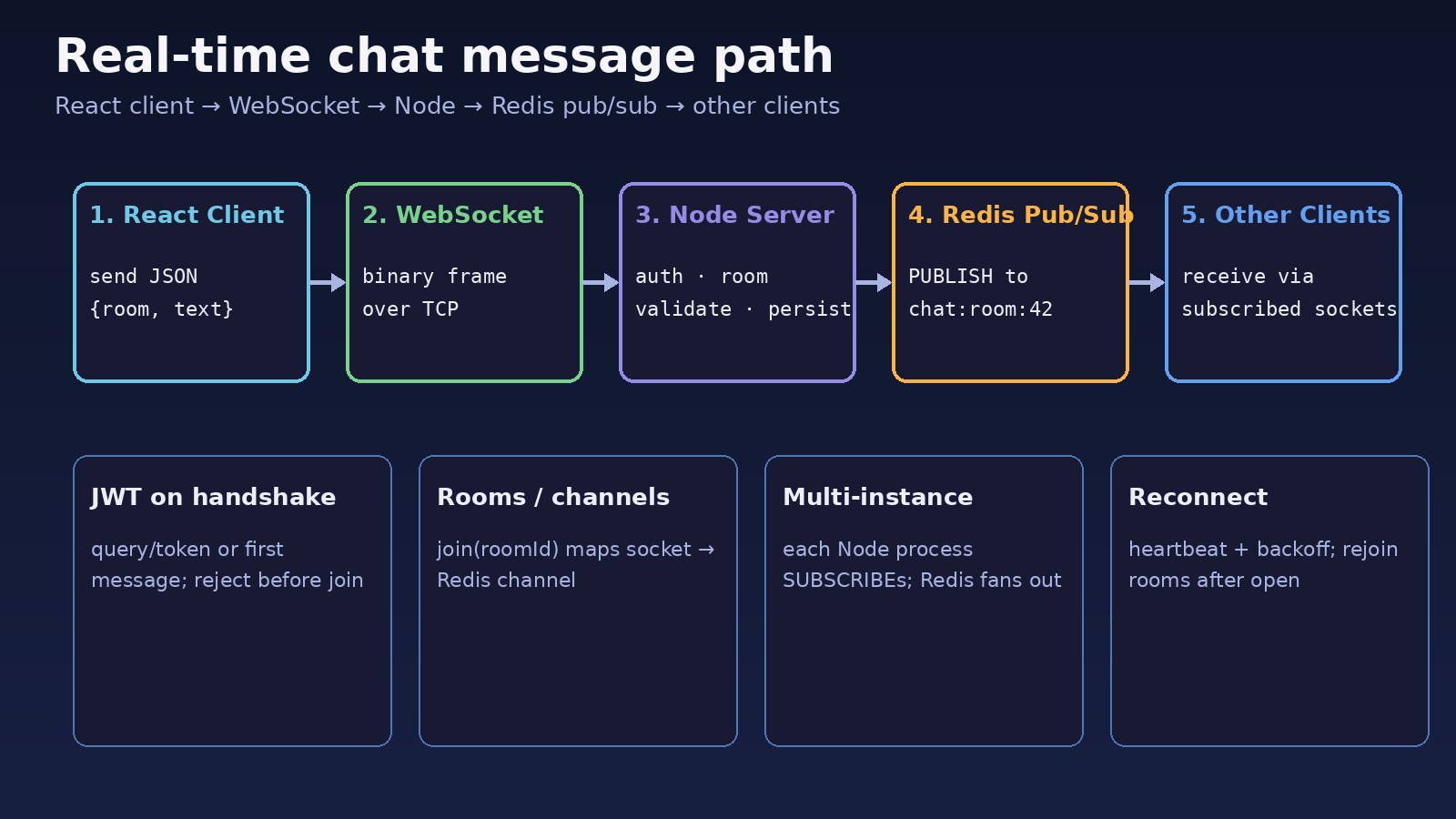
wss://and join rooms. Auth belongs on the WebSocket handshake (or the first framed message before any join). - No heartbeat. Half-open TCP connections look alive until the next send; proxies also idle-timeout quiet sockets.
- No reconnect state restore. A new socket does not automatically rejoin rooms or replay missed events.
For durable delivery vs fire-and-forget fan-out, compare patterns in Redis Pub/Sub vs Streams and broader queue design in message queue architecture.
Step-by-Step Solution: Build Real-Time Chat with WebSocket React Node.js
Step 1: Choose the server library
Use ws for a thin RFC 6455 layer, or Socket.IO when you want rooms, acks, and client reconnect with less boilerplate. Both work with React; Socket.IO can fall back to HTTP long-polling. This guide shows both shapes.
Step 2: Open a WebSocket server and define message shapes
Agree on JSON envelopes early, for example { type, roomId, text, messageId, ts }. Keep control messages (join, leave, ping/pong) separate from chat payloads so clients can route them cleanly.
Step 3: Authenticate on the handshake (JWT)
Pass a short-lived JWT as a query param (?token=…) or Sec-WebSocket-Protocol subprotocol, verify it in the server's connection handler, and close with an application code (for example 4001) on failure. Never join a room before auth succeeds. Rotate secrets and keep TTLs short; refresh tokens over HTTPS before reconnecting.
Step 4: Implement rooms / channels
On join, map socket → Set(roomId) and roomId → Set(socket). Broadcast only to sockets in that room. With Socket.IO this is socket.join(roomId) and io.to(roomId).emit(…).
Step 5: Fan out across instances with Redis pub/sub
When process A receives a message, publish it to Redis channel chat:room:{id}. Every Node process subscribes and forwards to local sockets in that room. Without this, sticky sessions still leave users on different pods isolated. Persist messages to Postgres (or similar) for history; Redis here is the live bus, not the source of truth.
Step 6: Heartbeat, reconnect, and catch-up
Server or client application pings every ~25s; close silent sockets. Clients reconnect with exponential backoff and jitter, re-send JWT, rejoin rooms, then GET /messages?after=lastId for the gap. See the dedicated websocket reconnect guide for client patterns.
Code/Commands for a WebSocket Chat Application
Node.js server with ws + JWT + Redis
# install
npm init -y
npm i ws jsonwebtoken redis dotenv
# REDIS_URL=redis://127.0.0.1:6379 JWT_SECRET=… PORT=8080// server.mjs
import http from 'node:http';
import { WebSocketServer } from 'ws';
import jwt from 'jsonwebtoken';
import { createClient } from 'redis';
import 'dotenv/config';
const server = http.createServer();
const wss = new WebSocketServer({ server });
const pub = createClient({ url: process.env.REDIS_URL });
const sub = pub.duplicate();
await Promise.all([pub.connect(), sub.connect()]);
const rooms = new Map(); // roomId -> Set<WebSocket>
function addToRoom(ws, roomId) {
if (!rooms.has(roomId)) rooms.set(roomId, new Set());
rooms.get(roomId).add(ws);
ws.rooms = ws.rooms || new Set();
ws.rooms.add(roomId);
}
function localBroadcast(roomId, payload, except) {
const set = rooms.get(roomId);
if (!set) return;
const data = JSON.stringify(payload);
for (const client of set) {
if (client !== except && client.readyState === 1) client.send(data);
}
}
await sub.pSubscribe('chat:room:*', (message, channel) => {
const roomId = channel.slice('chat:room:'.length);
const payload = JSON.parse(message);
localBroadcast(roomId, payload);
});
wss.on('connection', (ws, req) => {
try {
const url = new URL(req.url, 'http://localhost');
const token = url.searchParams.get('token');
ws.user = jwt.verify(token, process.env.JWT_SECRET);
} catch {
ws.close(4001, 'unauthorized');
return;
}
ws.isAlive = true;
ws.on('pong', () => { ws.isAlive = true; });
ws.on('message', async (buf) => {
let msg; try { msg = JSON.parse(buf.toString()); } catch { return; }
if (msg.type === 'join' && msg.roomId) {
addToRoom(ws, String(msg.roomId));
return;
}
if (msg.type === 'chat' && msg.roomId && msg.text) {
const payload = {
type: 'chat',
roomId: String(msg.roomId),
text: String(msg.text).slice(0, 2000),
userId: ws.user.sub,
messageId: crypto.randomUUID(),
ts: Date.now(),
};
// TODO: INSERT into messages table here
await pub.publish(`chat:room:${payload.roomId}`, JSON.stringify(payload));
// publisher also delivers locally via pSubscribe
}
});
ws.on('close', () => {
for (const roomId of ws.rooms || []) rooms.get(roomId)?.delete(ws);
});
});
setInterval(() => {
for (const ws of wss.clients) {
if (!ws.isAlive) return ws.terminate();
ws.isAlive = false;
ws.ping();
}
}, 25000);
server.listen(process.env.PORT || 8080);React client (native WebSocket)
// useChatSocket.js
import { useEffect, useRef, useState } from 'react';

export function useChatSocket({ url, token, roomId, onMessage }) {
  const wsRef = useRef(null);
  const [status, setStatus] = useState('idle');
  const attempt = useRef(0);

  useEffect(() => {
    let stopped = false;
    let timer;

    const connect = () => {
      setStatus('connecting');
      const ws = new WebSocket(`${url}?token=${encodeURIComponent(token)}`);
      wsRef.current = ws;

      ws.onopen = () => {
        attempt.current = 0;
        setStatus('open');
        ws.send(JSON.stringify({ type: 'join', roomId }));
      };
      ws.onmessage = (ev) => {
        const msg = JSON.parse(ev.data);
        onMessage?.(msg);
      };
      ws.onclose = (ev) => {
        setStatus('closed');
        if (stopped || ev.code === 4001) return;
        const delay = Math.min(30000, 1000 * 2 ** attempt.current);
        const jitter = Math.random() * delay;
        attempt.current += 1;
        timer = setTimeout(connect, jitter);
      };
    };

    connect();
    return () => { stopped = true; clearTimeout(timer); wsRef.current?.close(1000); };
  }, [url, token, roomId]);

  const send = (text) => {
    const ws = wsRef.current;
    if (!ws || ws.readyState !== WebSocket.OPEN) return;
    ws.send(JSON.stringify({ type: 'chat', roomId, text }));
  };

  return { status, send };
}
Socket.IO alternative (rooms + Redis adapter)
npm i socket.io @socket.io/redis-adapter redis
# server
import { Server } from 'socket.io';
import { createAdapter } from '@socket.io/redis-adapter';
import { createClient } from 'redis';

const pub = createClient({ url: process.env.REDIS_URL });
const sub = pub.duplicate();
await Promise.all([pub.connect(), sub.connect()]);

const io = new Server(3000, { cors: { origin: process.env.WEB_ORIGIN } });
io.adapter(createAdapter(pub, sub));

io.use((socket, next) => {
  try {
    socket.user = jwt.verify(socket.handshake.auth.token, process.env.JWT_SECRET);
    next();
  } catch { next(new Error('unauthorized')); }
});

io.on('connection', (socket) => {
  socket.on('join', (roomId) => socket.join(String(roomId)));
  socket.on('chat', async ({ roomId, text }) => {
    const payload = { /* same shape */ roomId, text, userId: socket.user.sub, ts: Date.now() };
    io.to(String(roomId)).emit('chat', payload);
  });
});
Quick local checks
redis-cli PING
redis-cli PUBSUB CHANNELS 'chat:room:*'
# two terminals: node server.mjs
# wscat -c 'ws://127.0.0.1:8080?token=YOUR_JWT'
# {"type":"join","roomId":"42"}
# {"type":"chat","roomId":"42","text":"hello"}
Verification
- Two browsers (or
wscatsessions) with valid JWTs join the sameroomId; a chat from one appears on the other within a fraction of a second. - Invalid or missing token → close code
4001(or Socket.IO connect error); no room join occurs. - Run two Node processes on different ports behind a simple proxy; with Redis pub/sub (or the Socket.IO Redis adapter), cross-instance delivery still works.
redis-cli PUBSUB CHANNELS 'chat:room:*'shows active room channels while clients are joined.- Kill Wi-Fi briefly: client status moves to closed, then reconnects with backoff, rejoins, and can fetch history via HTTP
after=lastId. - Leave a quiet connection open past your proxy idle timeout; heartbeat traffic should keep it alive, or the client should detect the drop and reconnect.
Prevention: Keep Real-Time Chat Reliable
- Always authenticate the socket before
join; treat room IDs as authorization-checked resources, not public strings. - Use Redis (or an equivalent bus) whenever you run more than one server process.
- Persist chat history in a database; use Redis pub/sub for live fan-out only (or Streams if you need replay from the bus).
- Ship reconnect with jitter and room rejoin; document close codes your clients must not retry.
- Raise proxy
proxy_read_timeoutabove your heartbeat interval; terminate dead sockets server-side. - Cap message size and rate-limit per user to limit abuse on open sockets.
FAQs
What is a websocket chat application in practice?
Browsers hold a WebSocket to a chat server, join rooms, and exchange messages in real time—usually with auth, DB persistence, and a pub/sub layer for scale.
Should I use WebSocket React Node.js with ws or Socket.IO?
Prefer ws when you want a minimal protocol and already have reconnect/auth helpers. Prefer Socket.IO when you want rooms, acks, and client reconnect with less custom code—and add @socket.io/redis-adapter for multi-instance.
Why do I need Redis for real-time chat?
Each Node process only sees its own sockets. Redis pub/sub (or the Socket.IO Redis adapter) copies events to every instance so users on different pods still share a room.
Where should JWT auth happen?
On the WebSocket handshake (query, header, or Socket.IO auth) or as the first message before any join. Closing unauthorized sockets early is safer than filtering later.
How is this different from HTTP polling?
Polling repeatedly asks "anything new?"; WebSockets leave the connection open so the server pushes. That cuts latency and idle request volume for chat workloads.
What about missed messages while reconnecting?
Pub/sub does not replay. Store messages in your DB with monotonic IDs and let the client fetch ?after=lastId after onopen and room rejoin. For bus-level replay, consider Redis Streams instead of pure pub/sub.



Comments
Join the discussion. Replies load on demand, up to 5 levels.
0 threads
No comments yet
Be the first to start the conversation.