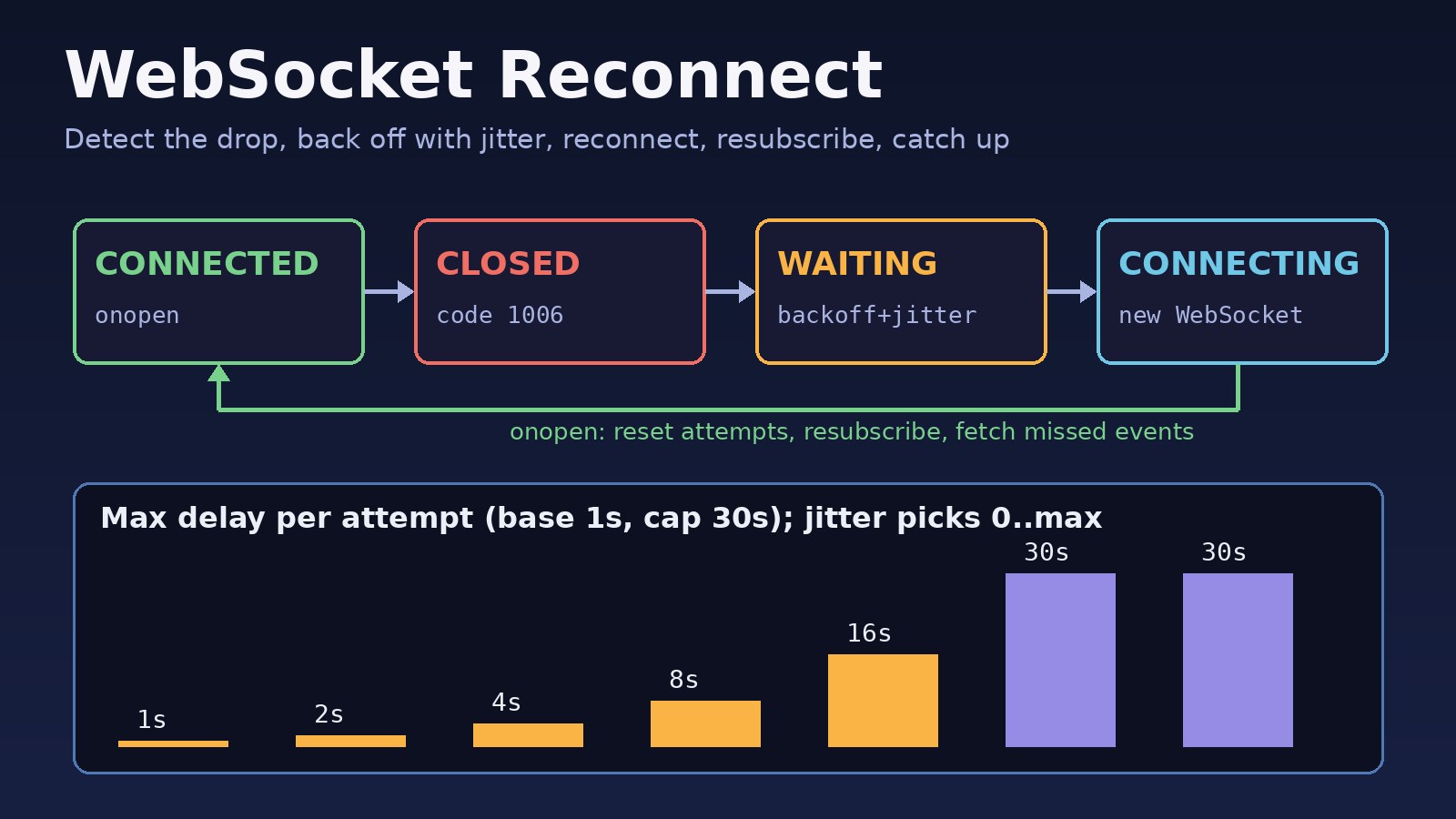
Your dashboard shows live orders, chat messages or stock updates, and everything works until a laptop wakes from sleep, a phone switches from Wi-Fi to mobile data, or you deploy a new server build. Then the socket silently dies and the screen stops updating. The browser WebSocket API does not retry on its own, so a websocket reconnect strategy is something you have to build: detect the drop, retry with backoff, restore subscriptions and fetch what was missed. This guide shows reliable reconnect logic for plain WebSockets, React, Socket.IO and Laravel Reverb/Echo, plus the server and Nginx settings that cause most unexpected disconnects.
Problem: WebSocket Connections Drop and Never Come Back
A WebSocket is a single long-lived TCP connection. Anything between the browser and your server can end it: a network change, an idle timeout on a proxy or load balancer, a container restart, or the server closing it during a deploy. When that happens the client receives a close event (sometimes much later than the actual failure) and the WebSocket object is finished. It cannot be reopened. Unless your code creates a new connection, the app stays offline until the user refreshes the page.
Symptoms
- Live data stops updating, but the page shows no error until refresh.
- The console shows
WebSocket connection to 'wss://example.com/ws' failed:after a network change or deploy. WebSocket is already in CLOSING or CLOSED state.when your code callssend()on a dead socket.- The
closeevent reports code1006(abnormal closure, no close frame received) or1001(going away). - Connections drop at a regular interval, often around 60 seconds of inactivity.
- After a server restart, every client reconnects at the same moment and the server or database spikes.
- After reconnecting, users stop receiving events for channels they had joined, or miss messages sent while they were offline.
- In React, the number of open sockets grows each time a component re-renders or remounts.
Root Cause: Why Connections Drop and Retries Fail
- No built-in retry. The browser API only reports the close. Reconnection is application code (libraries like Socket.IO and pusher-js add it for you).
- Half-open connections. If the network disappears without a TCP close, neither side may notice for a long time. Without a heartbeat, the client thinks it is connected while nothing arrives.
- Idle timeouts. Nginx's
proxy_read_timeoutdefaults to 60 seconds, and cloud load balancers have their own idle timeouts. A quiet socket gets cut. - Naive retry loops. Reconnecting immediately in
onclosewithout delay creates a tight loop while the server is down, and fixed delays make all clients retry in sync (a thundering herd). - Lost state. Subscriptions, joined rooms and auth live on the old connection. A new socket starts empty, and messages sent in the gap are gone unless you fetch them.
- Duplicate connections. Creating sockets in render code or effects without cleanup leaves old sockets reconnecting in the background.
If the socket never connects in the first place, that is a handshake problem, not a reconnect problem. Fix it first with the WebSocket connection failed guide.
Step-by-Step Solution: Build WebSocket Reconnect Logic
Step 1: Read the close code before deciding to retry
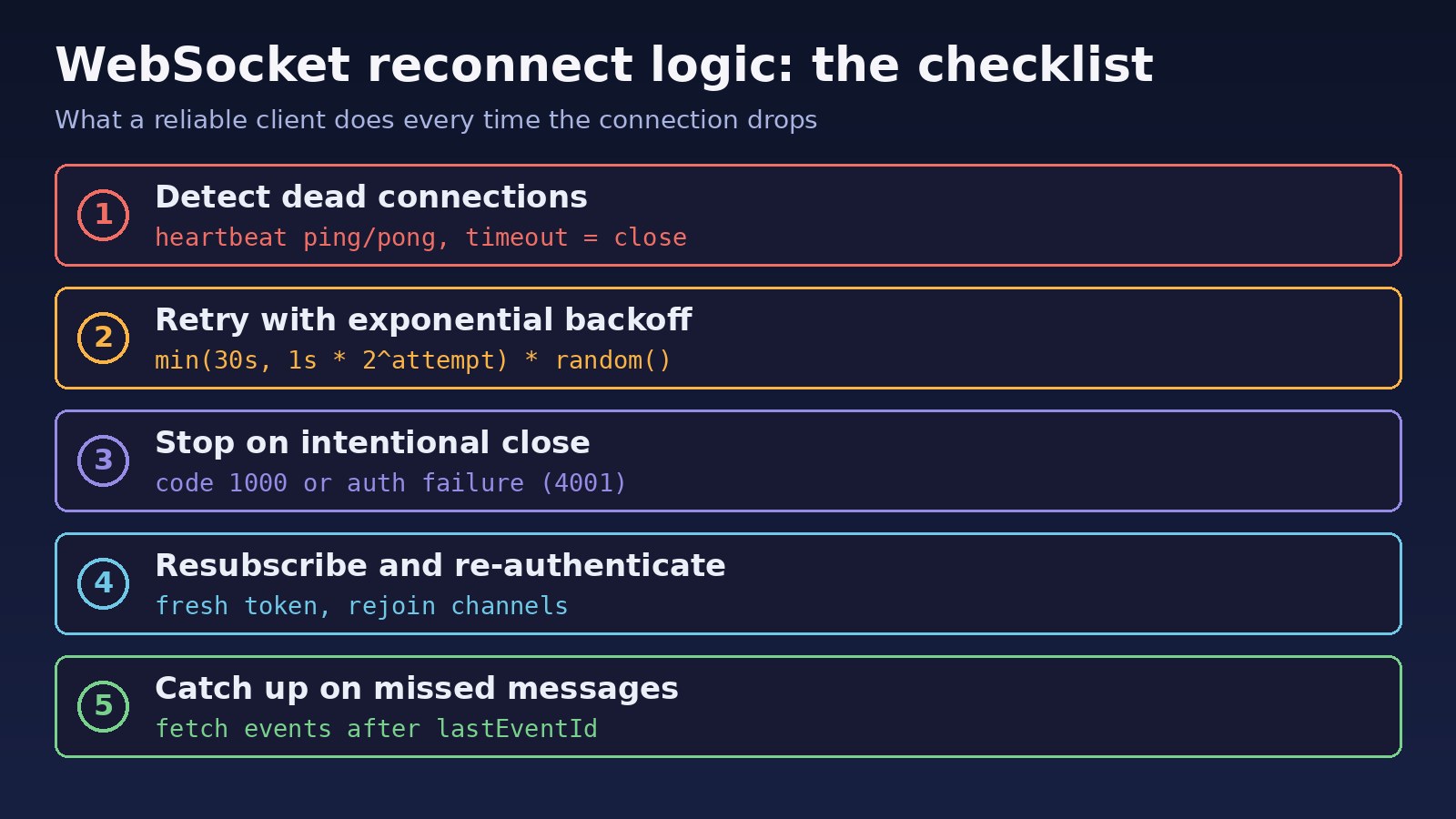
Log event.code, event.reason and event.wasClean in the close handler. Retry on network-type closes such as 1006, 1001, 1011 (server error), 1012 (service restart) and 1013 (try again later). Do not retry when you closed the socket yourself with 1000, or when the server rejects the user with an application code in the 4000–4999 range that you reserve for auth or permission failures. Retrying a revoked token forever only adds load.
Step 2: Use exponential backoff with jitter for connection retry
Wait longer after each failed attempt and cap the delay, for example 1s, 2s, 4s, 8s, up to 30s. Then randomize the wait ("full jitter": a random value between 0 and the current cap) so thousands of clients don't hit the server at the same moment after a restart. Reset the attempt counter only after a connection has opened successfully.
Step 3: Add a heartbeat to detect dead connections
Browsers automatically answer protocol-level ping frames from the server, but JavaScript cannot send pings itself. So either have the server send pings (and close sockets that stop answering), or add an application-level heartbeat: the client sends {"type":"ping"} every 25 seconds and closes the socket if no pong arrives within a timeout. Closing triggers your normal reconnect path. Regular traffic also keeps proxies from treating the connection as idle.
Step 4: React to online, offline and tab visibility
Listen to the online event to reconnect immediately instead of waiting out a long backoff, and pause retries while navigator.onLine is false. When a hidden tab becomes visible again, check the socket state and reconnect if needed.
Step 5: Restore state after reconnecting
In onopen, re-send authentication, rejoin rooms or channels, and fetch events newer than the last one the client processed. Give every event an increasing id, store the last id on the client and ask the server for anything after it (an HTTP endpoint is fine). If you use Redis to fan out events, Redis Streams make this replay much easier than Pub/Sub; see Redis Pub/Sub vs Redis Streams.
Step 6: Fix server and proxy timeouts
Raise Nginx proxy_read_timeout and proxy_send_timeout above your heartbeat interval, and check your load balancer's idle timeout. On deploys, close sockets with code 1012 so clients know to come back, and let backoff with jitter spread the reconnections out.
Code/Commands Examples
Plain JavaScript reconnecting WebSocket client
class ReconnectingSocket {
  constructor(url, { onMessage, onOpen, onStatus } = {}) {
    this.url = url;
    this.onMessage = onMessage;
    this.onOpen = onOpen;
    this.onStatus = onStatus || (() => {});
    this.attempt = 0;
    this.stopped = false;
    this.handleOnline = () => this.reconnectNow();
    window.addEventListener('online', this.handleOnline);
    this.connect();
  }

  connect() {
    if (this.stopped) return;
    this.onStatus('connecting');
    const ws = new WebSocket(this.url);
    this.ws = ws;

    ws.onopen = () => {
      this.attempt = 0;
      this.onStatus('connected');
      this.startHeartbeat();
      this.onOpen?.(this);           // re-auth, resubscribe, fetch missed events
    };

    ws.onmessage = (e) => {
      const msg = JSON.parse(e.data);
      if (msg.type === 'pong') { clearTimeout(this.pongTimer); return; }
      this.onMessage?.(msg);
    };

    ws.onclose = (e) => {
      this.stopHeartbeat();
      if (this.ws !== ws) return;    // an old socket closing after a manual reconnect
      console.warn('socket closed', e.code, e.reason, e.wasClean);
      const fatal = e.code === 1000 || (e.code >= 4000 && e.code < 4100);
      if (this.stopped || fatal) { this.onStatus('closed'); return; }
      this.scheduleReconnect();
    };
  }

  scheduleReconnect() {
    clearTimeout(this.retryTimer);
    if (!navigator.onLine) { this.onStatus('offline'); return; } // 'online' event resumes
    const cap = Math.min(30000, 1000 * 2 ** this.attempt);
    const delay = Math.random() * cap;   // full jitter
    this.attempt++;
    this.onStatus('reconnecting');
    this.retryTimer = setTimeout(() => this.connect(), delay);
  }

  reconnectNow() {
    const rs = this.ws?.readyState;
    if (this.stopped || rs === WebSocket.OPEN || rs === WebSocket.CONNECTING) return;
    clearTimeout(this.retryTimer);
    this.attempt = 0;
    this.connect();
  }

  startHeartbeat() {
    this.pingTimer = setInterval(() => {
      if (this.ws.readyState !== WebSocket.OPEN) return;
      this.ws.send(JSON.stringify({ type: 'ping' }));
      clearTimeout(this.pongTimer);
      this.pongTimer = setTimeout(() => this.ws.close(4999, 'heartbeat timeout'), 10000);
    }, 25000);
  }

  stopHeartbeat() { clearInterval(this.pingTimer); clearTimeout(this.pongTimer); }

  send(data) {
    if (this.ws?.readyState === WebSocket.OPEN) { this.ws.send(JSON.stringify(data)); return true; }
    return false;                    // queue it or show "offline" instead of throwing
  }

  close() {
    this.stopped = true;
    clearTimeout(this.retryTimer);
    this.stopHeartbeat();
    window.removeEventListener('online', this.handleOnline);
    this.ws?.close(1000, 'client closed');
  }
}
Code 4999 is a private code chosen for the heartbeat timeout; it falls outside the fatal range, so it triggers a retry. Use your own range (here 4000–4099) for errors that should stop retries.
React hook with cleanup
Create the socket inside useEffect and close it in the cleanup function, otherwise remounts leave extra sockets reconnecting forever. If an effect keeps re-running, check its dependencies (the same issue covered in fixing a useEffect infinite loop).
import { useEffect, useRef, useState } from 'react';

export function useLiveSocket(url, onMessage) {
  const [status, setStatus] = useState('connecting');
  const handler = useRef(onMessage);
  handler.current = onMessage;

  useEffect(() => {
    const sock = new ReconnectingSocket(url, {
      onMessage: (m) => handler.current(m),
      onStatus: setStatus,
      onOpen: (s) => s.send({ type: 'resume', lastEventId: localStorage.getItem('lastEventId') }),
    });
    return () => sock.close();       // runs on unmount and before url changes
  }, [url]);

  return status;                     // show a "Reconnecting..." banner when not 'connected'
}
In Next.js, use this only in client components ('use client'), because WebSocket and window do not exist during server rendering.
Socket.IO reconnection options
import { io } from 'socket.io-client';

const socket = io('https://api.example.com', {
  reconnection: true,
  reconnectionDelay: 1000,       // first retry after ~1s
  reconnectionDelayMax: 30000,   // cap
  randomizationFactor: 0.5,      // jitter
});

socket.on('connect', () => socket.emit('join', { room: 'orders' })); // rejoin on every connect

socket.on('disconnect', (reason) => {
  if (reason === 'io server disconnect') socket.connect(); // server kicked us: no auto retry
});

socket.io.on('reconnect_attempt', (n) => console.log('reconnect attempt', n));
socket.io.on('reconnect_failed', () => console.log('gave up'));
Laravel Echo with Reverb: watch the connection state
Echo uses pusher-js for Reverb, which already reconnects. Your job is to show the state and refresh data after it comes back:
const conn = window.Echo.connector.pusher.connection;
conn.bind('state_change', ({ previous, current }) => {
  console.log('echo', previous, '->', current); // connecting, connected, unavailable, disconnected...
  if (previous !== 'connected' && current === 'connected') {
    refreshDashboard();          // fetch what changed while offline
  }
});
Node.js server heartbeat with the ws library
import { WebSocketServer } from 'ws';
const wss = new WebSocketServer({ port: 8080 });

wss.on('connection', (ws) => {
  ws.isAlive = true;
  ws.on('pong', () => { ws.isAlive = true; });
  ws.on('message', (raw) => {
    const msg = JSON.parse(raw);
    if (msg.type === 'ping') ws.send(JSON.stringify({ type: 'pong' }));
  });
});

const interval = setInterval(() => {
  for (const ws of wss.clients) {
    if (!ws.isAlive) { ws.terminate(); continue; }   // dead peer
    ws.isAlive = false;
    ws.ping();                                       // browsers reply automatically
  }
}, 30000);
wss.on('close', () => clearInterval(interval));
Nginx timeouts for long-lived sockets
location /ws/ {
    proxy_pass http://app:8080;
    proxy_http_version 1.1;
    proxy_set_header Upgrade $http_upgrade;
    proxy_set_header Connection "upgrade";
    proxy_read_timeout 3600s;
    proxy_send_timeout 3600s;
}

# then
sudo nginx -t && sudo systemctl reload nginx
Commands to test reconnects
# connect from a terminal and watch for drops
npx wscat -c wss://example.com/ws/

# simulate a server restart
docker compose restart websocket      # or: php artisan reverb:restart

# count established connections on the socket port
ss -tn state established '( sport = :8080 )' | wc -l
Verification
- Open Chrome DevTools, Network tab, filter WS. Set throttling to Offline for 20 seconds, then back to No throttling. You should see one new socket appear and the UI return to "connected" without a page refresh.
- Restart the WebSocket server or container. Confirm clients reconnect with spread-out delays rather than all at once (check timestamps in server logs).
- Check the console logs: each close prints a code, and retries stop after a
1000close or an auth failure code. - Send events while a client is offline, reconnect, and confirm they appear exactly once.
- Leave a tab idle for longer than your proxy timeout. With the heartbeat and Nginx settings, the connection should stay open.
- Navigate between pages in your React app several times and confirm only one socket is open in the WS list.
Prevention
- Wrap the socket in one module or hook and never create raw
WebSocketobjects across the codebase. - Treat the socket as a notification channel, not the source of truth. Load state over HTTP and use socket events to update it, so a missed event is recoverable.
- Give events ids and make handlers idempotent, so replays after reconnect don't double-apply changes.
- Keep heartbeat interval shorter than every idle timeout in the path (browser to CDN to load balancer to Nginx to app).
- Use refresh-able, short-lived tokens for socket auth, and fetch a new one before reconnecting.
- Show connection state to users ("Reconnecting...") and disable actions that need a live socket.
- Monitor connection counts and reconnect rates per deploy so a broken release shows up quickly.
FAQs
Does the browser WebSocket API reconnect automatically?
No. Once a WebSocket closes it cannot be reused. You must create a new instance, ideally from a wrapper with backoff, as shown above. Socket.IO and pusher-js (used by Laravel Echo) include their own reconnection.
What is good WebSocket reconnect logic?
Retry only on unexpected closes, use exponential backoff with a cap and jitter, reset the counter after a successful open, detect dead connections with a heartbeat, and resubscribe plus fetch missed events in onopen.
How long should the connection retry delay be?
A common starting point is 1 second doubling up to a 30 second cap, with random jitter. Choose values based on how quickly users need data back and how many clients your server must absorb after a restart.
Why does my WebSocket close with code 1006?
1006 means the connection ended without a proper close frame: network loss, a proxy timeout, a crashed server or a failed handshake. It is a signal to retry, but if it happens on every attempt, debug the handshake and proxy configuration.
How do I avoid duplicate messages after a websocket reconnect?
Track the last processed event id on the client, request only newer events, and ignore any event whose id you have already handled.
Should I stop retrying at some point?
Stop on intentional closes and auth failures. For network problems, many apps retry indefinitely at the capped delay while showing an offline banner, plus an immediate retry when the browser fires online.



Comments
Join the discussion. Replies load on demand, up to 5 levels.
0 threads
No comments yet
Be the first to start the conversation.