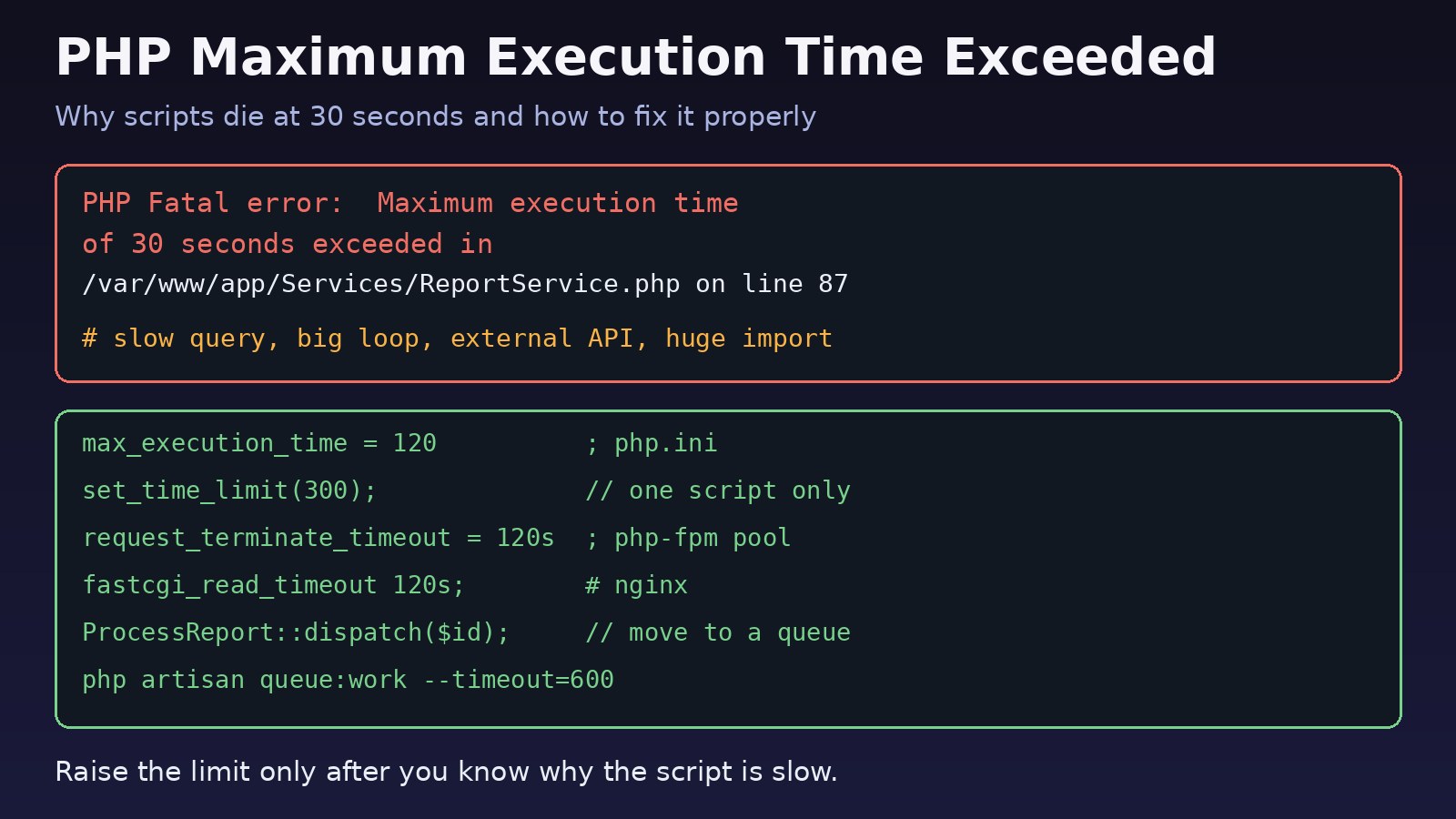
A report page spins for a while and then shows a white screen or a 500 error, and the log says Maximum execution time of 30 seconds exceeded. This is the maximum execution time exceeded php error, and it means PHP stopped your script because it ran longer than the configured limit. The quick fix is to raise the limit, but the right fix depends on why the script is slow and which layer actually cut it off. This guide covers both.
The Problem: PHP Stops a Long-Running Script
PHP has a safety limit called max_execution_time. When a web request runs longer than that number of seconds, PHP throws a fatal error and ends the script. The default is 30 seconds. On the command line (CLI) the default is 0, which means no limit, so the same code can work in php artisan or a cron job and fail in the browser.
The limit exists so one bad request cannot hold a PHP worker forever. If you simply set it to 0 everywhere, a slow page can tie up all your PHP-FPM workers and take the whole site down.
Symptoms
You will usually see one of these messages:
PHP Fatal error:  Maximum execution time of 30 seconds exceeded in /var/www/app/Services/ReportService.php on line 87

Symfony\Component\ErrorHandler\Error\FatalError
Maximum execution time of 60 seconds exceeded

Fatal error: Maximum execution time of 300 seconds exceeded in vendor/guzzlehttp/guzzle/src/Handler/CurlHandler.php- A large CSV or Excel import stops part way through.
- A PDF or report export works for small date ranges and fails for big ones.
- An admin page in an ERP-style system times out only for customers with a lot of data.
- The browser shows
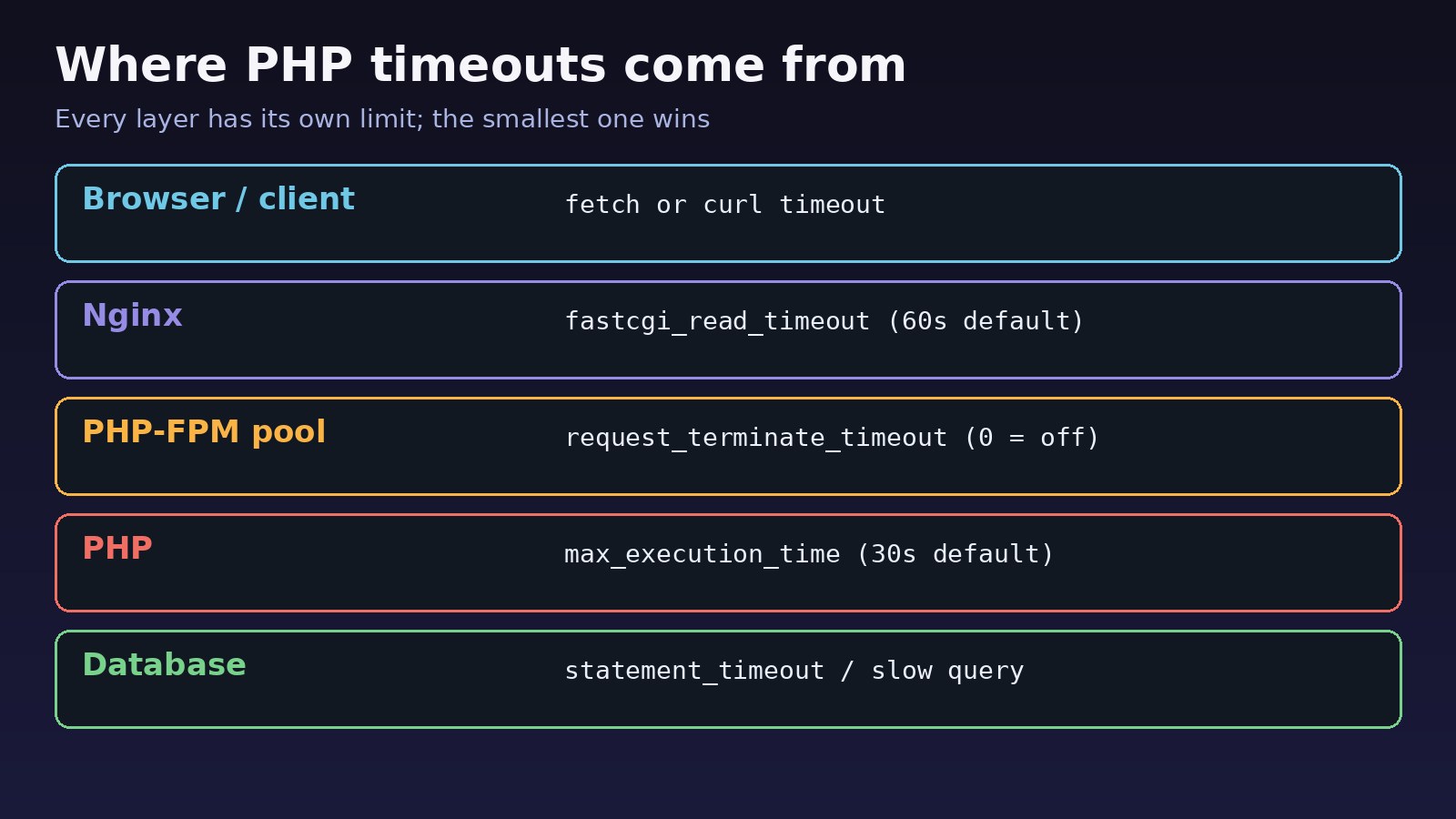
504 Gateway Timeoutor502 Bad Gatewayfrom Nginx instead of a PHP error. That means a different layer timed out first.
Root Cause of the PHP Timeout
The script took longer than the limit. Common reasons:
- Heavy work inside a web request. Imports, exports, sending many emails or resizing images in the request instead of in the background.
- Slow database queries. Missing indexes, N+1 queries in a loop, or loading a whole table into memory.
- External calls with no timeout. An HTTP API, SMTP server or file share that hangs while your code waits.
- An endless or very large loop. A
whileloop whose exit condition never becomes true, or recursion that never stops. - The limit is set lower than you think. A framework, a hosting panel, a
.user.inifile or the PHP-FPM pool overrides yourphp.ini.
One detail surprises people: on Linux, max_execution_time counts only the time the script itself is running. Time spent waiting on system calls, streams and database queries is not counted (on Windows it is real elapsed time). So a request can wait 90 seconds on a slow query and still be cut off by Nginx or PHP-FPM, not by PHP. That is why you have to check every layer.
Step-by-Step Solution to Increase Max Execution Time Safely
Step 1: Find the current limit and the file that sets it
The CLI and PHP-FPM read different php.ini files, so check the one your web server uses.
# CLI settings (not the web server!)
php --ini
php -i | grep max_execution_time

# PHP-FPM settings: list the loaded ini files for the FPM SAPI
ls /etc/php/8.3/fpm/php.ini /etc/php/8.3/fpm/conf.d/
grep -R "max_execution_time" /etc/php/8.3/fpm/

# Or create a temporary page, open it in the browser, then delete it
echo '<?php echo ini_get("max_execution_time"), " ", php_sapi_name();' > /var/www/html/limit.php
Replace 8.3 with your PHP version. Remove the test file as soon as you have read the value.
Step 2: Profile the slow part before raising anything
The error message gives you the file and line where the script was when time ran out. That is often inside the slow loop or query. Add simple timing around the suspect code:
$start = microtime(true);

$rows = $this->buildReportRows($from, $to);

\Log::info('report rows built', [
    'seconds' => round(microtime(true) - $start, 2),
    'count'   => count($rows),
]);
In Laravel, log slow queries during development so you can see which query is the problem:
// AppServiceProvider::boot()
use Illuminate\Support\Facades\DB;

DB::listen(function ($query) {
    if ($query->time > 500) { // milliseconds
        logger()->warning('slow query', ['sql' => $query->sql, 'ms' => $query->time]);
    }
});
If the slow part is a query, fix it first. Adding an index or removing an N+1 loop often turns a 60-second page into a 1-second page. The Laravel Eloquent optimization guide covers eager loading, chunk() and lazy() for large tables.
Step 3: Raise the PHP limit for the right scope
If the work is legitimately long, raise the limit as narrowly as you can. For one script, set it in code. set_time_limit() restarts the counter from zero each time you call it:
// Only this request gets 5 minutes
set_time_limit(300);

// Same effect
ini_set('max_execution_time', '300');

// In a long loop, give each batch a fresh budget
foreach ($batches as $batch) {
    set_time_limit(60);
    $this->process($batch);
}
To change it for the whole site, edit the FPM php.ini, or better, the pool file so it only affects that app:
; /etc/php/8.3/fpm/php.ini
max_execution_time = 120

; or per pool: /etc/php/8.3/fpm/pool.d/www.conf
php_admin_value[max_execution_time] = 120

# apply the change
sudo php-fpm8.3 -t
sudo systemctl restart php8.3-fpm
The php_value max_execution_time 300 line in .htaccess only works with Apache's mod_php. Under PHP-FPM it causes a 500 error; use a .user.ini file in the document root or the pool setting instead. Note that values set with php_admin_value cannot be changed by ini_set() in code.
Step 4: Match the PHP-FPM and Nginx timeouts
If PHP allows 120 seconds but Nginx gives up at 60, users still see an error. Set the layers so the outer one waits a little longer than the inner one:
; /etc/php/8.3/fpm/pool.d/www.conf
request_terminate_timeout = 130s

# /etc/nginx/sites-available/app.conf
location ~ \.php$ {
    include snippets/fastcgi-php.conf;
    fastcgi_pass unix:/run/php/php8.3-fpm.sock;
    fastcgi_read_timeout 140s;
}

sudo nginx -t && sudo systemctl reload nginx
When request_terminate_timeout kills a worker, Nginx usually logs upstream prematurely closed connection and returns 502. When fastcgi_read_timeout runs out, you get 504. The details are in how to fix Nginx 504 Gateway Timeout and 502 Bad Gateway Nginx causes and fixes.
Step 5: Put timeouts on external calls
Never let PHP wait forever on another server. Set connect and request timeouts so a dead API fails fast with a clear error:
// Laravel HTTP client
$response = Http::connectTimeout(5)->timeout(15)->retry(2, 500)->get($url);

// Plain cURL
curl_setopt($ch, CURLOPT_CONNECTTIMEOUT, 5);
curl_setopt($ch, CURLOPT_TIMEOUT, 15);

// Guzzle
$client = new \GuzzleHttp\Client(['connect_timeout' => 5, 'timeout' => 15]);
Step 6: Move long work to a queue
The best fix for imports, exports and bulk emails is to stop doing them inside the web request. Return a response right away and process the work in a queue worker, which runs on the CLI:
// Controller: respond immediately
ProcessSalesReport::dispatch($request->user()->id, $from, $to);
return back()->with('status', 'Your report is being generated. We will email you when it is ready.');

// app/Jobs/ProcessSalesReport.php
class ProcessSalesReport implements ShouldQueue
{
    use Dispatchable, InteractsWithQueue, Queueable, SerializesModels;

    public $timeout = 600; // seconds
    public $tries = 3;

    public function handle(): void
    {
        // build the report in chunks, store the file, notify the user
    }
}# run the worker with a matching timeout
php artisan queue:work redis --timeout=600 --tries=3
# config/queue.php: retry_after must be larger than the job timeout
'retry_after' => 660,If retry_after is shorter than the job timeout, a second worker can pick up the same job while the first is still running. Job timeouts also need the pcntl PHP extension. For a full worker setup with Supervisor, see Laravel queue with Redis.
Step 7: Process big data in chunks
Loading 500,000 rows with get() is slow and can also hit the memory limit. Stream them instead:
Order::where('created_at', '>=', $from)
    ->orderBy('id')
    ->chunkById(1000, function ($orders) use ($writer) {
        foreach ($orders as $order) {
            $writer->addRow([$order->id, $order->total, $order->status]);
        }
    });
Verification
- Load the test page from Step 1 again and confirm the new value for the
fpm-fcgiSAPI, then delete the page. - Run the slow action with the largest real data set and watch the logs:
tail -f storage/logs/laravel.log /var/log/nginx/error.log /var/log/php8.3-fpm.log. - Check that no new
Maximum execution time,upstream timed outorprematurely closedlines appear. - For queued work, run
php artisan queue:failedand confirm the job finished instead of failing with a timeout. - Time the request with
curl -o /dev/null -s -w "%{time_total}\n" https://example.com/reports/exportand confirm it is well under the limit.
Prevention
- Keep the web limit modest (30 to 120 seconds) and move anything slower to queues or scheduled commands.
- Set timeouts on every HTTP, SMTP and database client so failures are fast and visible.
- Index the columns you filter and sort by, and test pages with production-sized data before release.
- Keep the Nginx, PHP-FPM, PHP and queue timeouts documented together in your server setup so they stay in the right order.
- Log slow requests and slow queries in production so you see a page getting slower before it starts failing.
FAQs
How do I increase max execution time in PHP?
For one script, call set_time_limit(300). For the whole server, set max_execution_time in the PHP-FPM php.ini or pool file and restart PHP-FPM. Also raise fastcgi_read_timeout in Nginx if requests need more than 60 seconds.
Is it safe to set max_execution_time to 0?
Only for CLI scripts, where 0 is already the default. On a web server, unlimited requests can block all PHP-FPM workers and make the site stop responding. Use a queue for long work instead.
Why does my PHP timeout still happen after I changed php.ini?
You probably edited the CLI php.ini instead of the FPM one, forgot to restart PHP-FPM, or another setting overrides it, such as a pool php_admin_value, a .user.ini file or your code calling set_time_limit().
Why do I get 504 instead of the maximum execution time exceeded php error?
Nginx stopped waiting before PHP hit its own limit. Raise fastcgi_read_timeout so it is a little longer than max_execution_time, or make the request faster.
Does max_execution_time include database query time?
On Linux, no. Time spent waiting for the database, streams and system calls is not counted. A slow query can still cause a 502 or 504 through PHP-FPM or Nginx timeouts.
How do I fix the timeout in Laravel artisan commands?
Artisan runs on the CLI, which has no limit by default. If a command still stops, check for a set_time_limit() call in your code or a timeout in the process manager or cron wrapper that starts it.



Comments
Join the discussion. Replies load on demand, up to 5 levels.
0 threads
No comments yet
Be the first to start the conversation.